The wwwroot folder is the conventional ASP.NET Core home for public static files. Store CSS, JavaScript, images, and static HTML there; by default, ASP.NET Core serves files only from this folder, helping keep other application folders private. section 4.2.2 section 13.1.1
Static-file requests follow a simple pattern:
- A request such as /moon.jpg is checked against the wwwroot folder. section 4.2.2
- When the file exists, StaticFileMiddleware returns it to the browser. section 4.2.2
- When the file is missing, the application returns an HTTP 404 response. section 4.2.2
- You may organize files inside wwwroot however you want; template subfolders are optional. section 13.1.1
Enable static files
A minimal application needs the static-file middleware in its pipeline: WebApplicationBuilder builder = WebApplication.CreateBuilder(args); WebApplication app = builder.Build(); app.UseStaticFiles(); app.Run(); With moon.jpg stored in wwwroot, requesting /moon.jpg returns the image. section 4.2.2
Figure 4.9 StaticFileMiddleware handles a request for a file. The middleware checks the wwwroot folder to see if whether requested moon.jpg file exists. The file exists, so the middleware retrieves it and returns it as the response to the web server and, ultimately, to the browser.
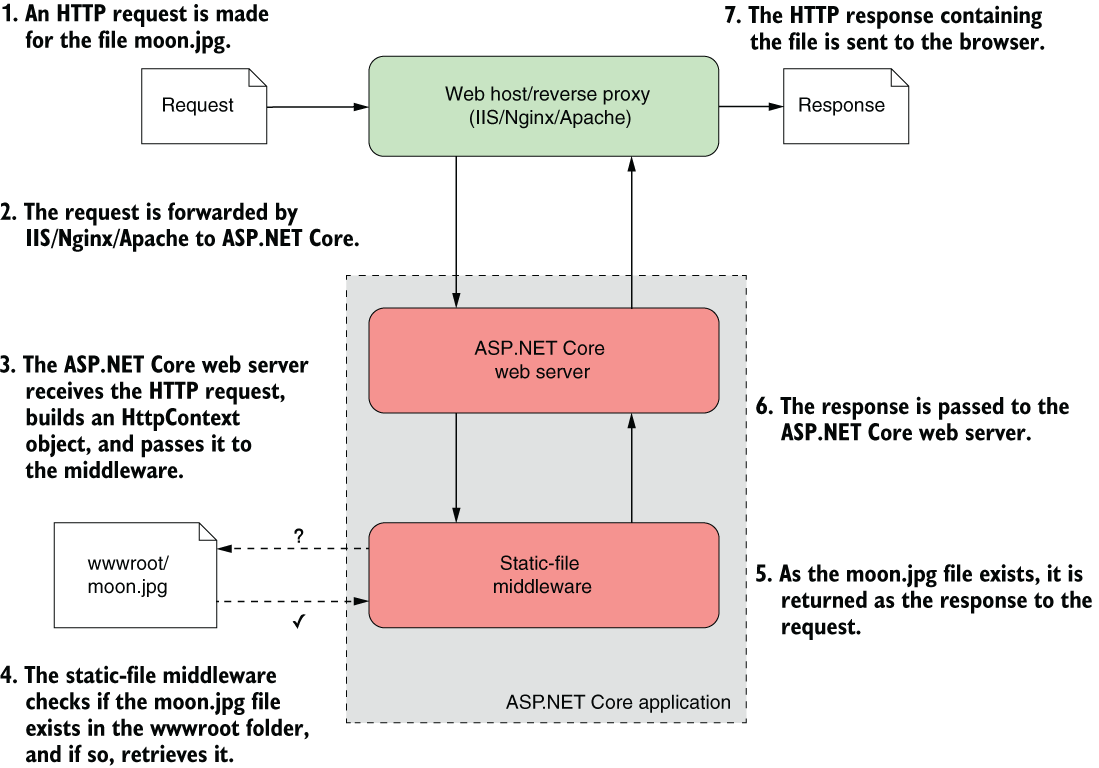
Trace how StaticFileMiddleware checks wwwroot, retrieves an existing file, and returns it through the web server to the browser. section 4.2.2
Deployment preserves this arrangement: dotnet publish copies the wwwroot folder and its contents into the publish output, so static assets travel with the application. section 27.1.1

