liveBook · Manning

X-height

As explained in Web Design Playground, Second Edition

X-height is the height of the main body of lowercase letters in a typeface.

X-height measures the distance from a typeface’s baseline to the top of lowercase letters such as x and o, including the bowl height in letters such as d, h, g, and y. section 20.3

When choosing type for small screens, look for:

  • A medium-to-large x-height—roughly half the font size or more—because it usually supports large counters and apertures. section 20.3
  • Similar x-height and legibility characteristics when pairing typefaces for headings and body text. section 20.3
Figure 20.2 When deciding on a typeface that will render well even on small displays, look for larger counters and apertures, good x-height, and low stroke contrast.
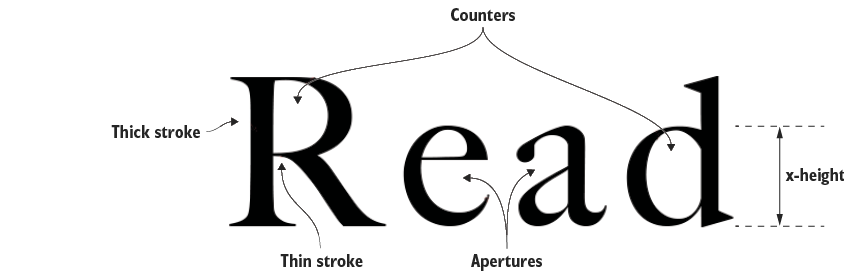
Compare x-height with counters, apertures, and stroke contrast when auditioning typefaces for small displays. section 20.3


How Web Design Playground, Second Edition covers it

How deep it goes
Defines the measurement and supplies a practical size heuristic, stopping short of deeper typographic analysis.
Examples
Uses x, o, d, h, g, and y, plus Google Fonts auditioning and typeface pairing.
What it assumes
Assumes basic familiarity with typefaces and font size while defining x-height from zero.
What you can do after
Evaluate typefaces for small-screen legibility using x-height alongside counters, apertures, and stroke contrast.
How it connects
Connects x-height with counters, apertures, stroke contrast, legibility, and typeface pairing.

Also explained in

Compare how 3 books explain x-height →

Related concepts

This explainer was generated by Manning's knowledge graph from the text of Web Design Playground, Second Edition. The section links point to the parts of the book it draws on.
