Zero-trust networking starts with a deliberately suspicious question: why should this identity access that resource? Instead of trusting users by default, deny access until each user is verified and granted the permissions they need. section 6.3
In Azure, Entra ID provides the identity-management center of gravity. It stores users and permissions, while MFA strengthens authentication and role-based access control (RBAC) limits authorization to defined scopes. section 6.3 section 6.9
A practical zero-trust setup works like a cautious doorman:
- Create identities in an Entra ID tenant rather than sharing broad access. section 6.3
- Verify users with authentication controls such as MFA. section 6.9
- Assign only the required permissions through RBAC, using a security principal, role definition, and scope. section 6.9
- Review paid security features and operational responsibilities rather than assuming every protection is included for free. section 6.3 section 6.0
A user who starts with no access
Create a new Entra ID user with a username, name, and password, then grant access only to the Azure subscription or resource that user actually needs. If the user lacks permission, the user cannot accidentally alter unrelated infrastructure—a pleasantly boring outcome. section 6.3 section 6.9
Figure 6.6 Create a new user in Entra ID.
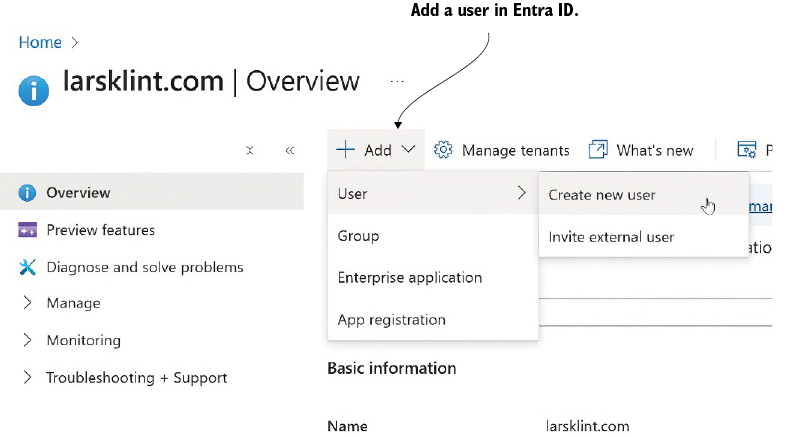
Use the Entra ID user-creation figure to anchor the first step of a deny-by-default workflow. section 6.3





