liveBook · Manning

Zip archive

As explained in Practical Automation with PowerShell: Effective scripting from the console to the cloud

An archive file is a file that stores retained data separately from its active working location.

A zip archive stores retained files separately from their active working location, making it useful for moving old logs into cold storage before cleanup. section 2.1

A practical archive-cleanup automation:

  • Identify the folder containing log files. section 2.1
  • Filter files by age, using a configurable day threshold. section 2.1
  • Add qualifying files to an archive file, then remove the archived originals. section 2.1

Thirty-day log retention threshold

For logs retained on active storage for 30 days, calculate the cutoff from the current time with PowerShell's DateTime.AddDays method, then archive files older than that cutoff. Retain the archive for the required seven-year period. section 2.1

Figure 2.1 Design the first phase of the file cleanup automation by defining the required parameters and the steps to perform, such as getting the files to archive, performing the archive, and then cleaning up the archived files.
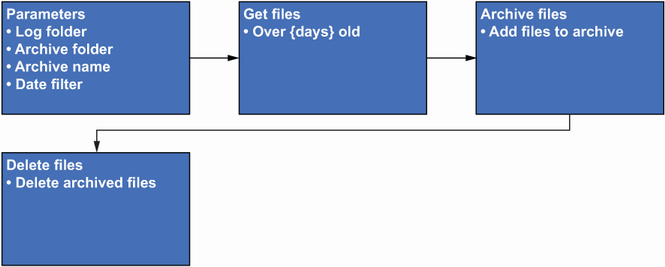
Use the workflow design to connect required parameters with file selection, archiving, and removal steps. section 2.1

How Practical Automation with PowerShell: Effective scripting from the console to the cloud covers it

How deep it goes
Explains requirements, parameters, date filtering, and workflow phases without detailing archive-file internals.
Examples
Uses log files older than 30 days and a seven-year retention requirement as the operational scenario.
What you can do after
Build it from scratch: design a PowerShell cleanup workflow that selects, archives, and removes files by age.
How it connects
Connects archive files with log cleanup, cold storage, PowerShell, DateTime, parameters, and retention policies.

Related concepts

This explainer was generated by Manning's knowledge graph from the text of Practical Automation with PowerShell: Effective scripting from the console to the cloud. The section links point to the parts of the book it draws on.