concept array in category ios

This is an excerpt from Manning's book Hello Swift!: iOS app programming for kids and other beginners.
Listing 6.2. String extension for Hang Your Word Upside-Down
extension String {

    subscript(value: Int) -> String {
        get {
            var j = 0
            for i in self.characters {
                if j == (value) {
                    return "\(i)"
                }
                j += 1
            }
            return ""
        }
        set(toSet) {
            var array: [String] = []
            var finalString: String = ""
            for i in self.characters {
                array.append("\(i)")
            }
            array[value] = toSet
            for i in array {
                finalString += i
            }
            self = finalString
        }
    }


}
How to loop through an array or dictionary ![]()
You’ve reached milestone 7, knitting variables into arrays and dictionaries. In this chapter, you’ll be knitting variables together. You’ve been using variables in different situations for quite some time. Now you’ll learn about using them in arrays and dictionaries. The attendance register that lists your names in order, for example, is an array. Your test scores in the past five quizzes you took are an array as well.
Imagine that ten kids have to give reports to the class. The teacher gives each one a piece of paper with a number from 1 to 10 on it. Frank gets 1, Amy gets 2, Maya gets 3, Tom gets 4, Timmy gets 5, and so on. This list is similar to an array in programming. An array is an ordered set of variables. In this example, the values are these kids’ names, and the numbers on the pieces of paper control the order:
Name1
Name2
Name3
. . .
nameN
Tim Joe Anna . . . Tanmay Unlike an array, a dictionary lets you assign values other than numbers to order your group of values. I go into more detail on this topic later, but for now, imagine that instead of writing numbers on those slips of paper, the teacher wrote the nicknames of the students. This makes a dictionary, which uses anything except numbers to order the variables.
To get the name of someone stored in the array you created, you also (in code) use the number. In programming, this number is called the index.
To access some value (friend’s name) from the array, you have to type the name of the array and then [<index>]. So to retrieve the first name from the array:
print("\(arrFriends[0])")This makes sense because "Tim" is at index 0 of the array. Note that the array indexes start with 0, as 0, 1, 2, 3, and so on. The indexes don’t start with 1 as 1, 2, 3, and so on. The index of an array starts at 0, not at 1, as you can see in figure 7.2.

This is an excerpt from Manning's book iOS Development with Swift.
4 Iterate over array 5 Iterate over array with index 6 Extract element from array 7 Extract range of elements from array
Set up an array of the available images and a variable that keeps track of the current image number. If you’ve used your own images, make the necessary changes to this array: let images = ["CradleMountain.JPG", "Laguna69.JPG", "PatagoniaSky.JPG"] var imageNo = 0

This is an excerpt from Manning's book Anyone Can Create an App: Beginning iPhone and iPad programming.
The first kind of collection that we’ll discuss is called the array. Let’s go back to the egg carton example—but this time, the eggs are numbered 0 through 11 (remember, in the programming world, counting starts with 0). The eggs were put in the carton in order, starting with egg 0 and ending with egg 11. The only way to get the eggs out of the carton is also in order. If you want to start cooking and you need an egg, you must start with the first egg—or to write it in a programming way, you want egg[0]. When you want the second egg, you get egg[1], and so on.
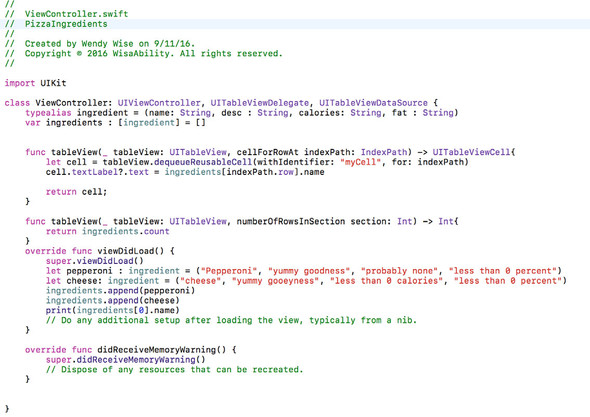
In this chapter, you’re going to continue with this process by first adding some data to an array and displaying it in the table, and then refactoring the data to separate the model from the view from the controller (the MVC pattern was discussed in chapter 17).
Open your LioN project again, and navigate to MainViewController so you can edit it. The first thing you need to do is to create an array of dummy data. You need to create the array at the class level so it’s available to all the functions. Do you remember how to create an array of strings at the class level? I added the following line below my class definition line:
var lionData = ["lion1", "lion2", "lion3", "lion4", "lion5", "lion6", "lion7"]You can make your lion data say whatever you want and add as many or as few items as you want, as long as it’s in an array called lionData and it contains strings. Now you need to do something with this data.
This is an excerpt from Manning's book Objective-C Fundamentals.
Another common scenario is the need to store multiple values of the same data type. C provides a handy data structure called an array to make this task easier. An array is a data structure that stores a list of items. Each item (or element) is stored consecutively, one after the other, in memory and can only be accessed by its relative position. This position is often called the item’s index. To declare an array capable of storing details of 150 boxes, you could write a variable declaration similar to this:
struct box boxes[150];With this statement, you’ve declared enough space to store 150 boxes but used only one variable name, boxes, to identify them all. The number specified in square brackets indicates the number of items that can be stored in the array.
To access the details of each box, you must provide the name of the array along with the index value of the desired element. By convention, the first element in an array has an index of 0, and each element thereafter has an increasing index value. This means that the last entry in a 150-element array will be accessible via index 149. The following statement will access and print the width of the sixth box:
Like strings, arrays can be immutable or mutable. Immutable arrays are handled by the NSArray class, and mutable ones are handled by the NSMutableArray subclass. Let’s learn how creating an NSArray instance is different from creating a C-style array.
You now have the building blocks for determining if a particular value is present in an array. To achieve this goal, you can use a for loop to step through each element in the array and use an if statement to compare the current element with the value you’re looking for. This process is demonstrated in the following listing.
In this listing you set up a loop
to step through each element in the array. The loop sets the loop counter variable i to the values 0 through [pets count] - 1. In the loop you fetch the array element at index i via the objectAtIndex: method and check to see if it’s equal to the value you are looking for
. If a match is found, you set the found variable to YES
and break out of the for loop immediately, because there’s no need to check any remaining array elements.

If you create an instance of the NSArray class, the array is said to be immutable because you can’t modify the structure or contents of the array after it’s been initially constructed. If you attempt to modify an NSArray instance, you’ll get an exception message such as the following listed to the Xcode debugger console, and your application will crash:
*** Terminating app due to uncaught exception
     'NSInternalInconsistencyException', reason: '*** - [NSCFArray
     replaceObjectAtIndex:withObject:]: mutating method sent to immutable
     object'
If you need to modify an array after it’s been created, you must make sure you create a mutable array. A good way to get started is by creating an empty array using the array factory method on the NSMutableArray class instead of the NSArray class. This creates an array that’s initially empty, but because the array is mutable, you’ll be able to append new elements to it at runtime as desired.
NSMutableArray *array = [NSMutableArray array];An NSMutableArray grows in size whenever you add elements to it. You can conceptually think of the array as allocating additional memory to the array to store each element as it’s added. But this isn’t the most efficient way to use memory. If you know ahead of time how many elements you intend to add to the array, it’s more efficient for the array to allocate enough memory to store all the elements in one go. As you may expect, NSMutableArray is smart: it provides another factory method called arrayWithCapacity: for this very case:
NSMutableArray *pets = [NSMutableArray arrayWithCapacity:50];This code snippet creates a new NSMutableArray and internally allocates enough memory to store a minimum of 50 elements. It’s important to note, however, that this is only a hint as to the number of items expected to eventually be added to the array. An array created via such a technique is perfectly able to store more than 50 elements and will allocate additional memory once the specified capacity is exceeded.
It’s also important not to confuse the capacity of an array with its length or count. Although the array just created has memory set aside to store at least 50 elements, if you ask for its current size via the count message, it will indicate 0 because you still haven’t physically added anything to it. The capacity is only a hint that allows the NSMutableArray class to avoid excessive memory allocations. Specifying a capacity of 50 means there won’t be any additional memory allocations until at least the 51st element is added to the array. Doing this may lead to potential performance gains and less memory fragmentation.
Now that you know how to create an NSMutableArray instance that allows you to dynamically modify its contents, how do you add additional elements to an array? One answer is to use the addObject: message, which allows you to add a new element to the end of an existing array:
[pets addObject:@"Pony"];This snippet expands the size of the array by one element and stores the string "Pony" in the newly added element. It’s also possible to insert an element into the middle of an array. For this, you can use insertObject:atIndex:, which expects the array index at which to insert the new element: