concept data source in category ios

This is an excerpt from Manning's book Anyone Can Create an App: Beginning iPhone and iPad programming.
Data sources are exactly what they sound like—sources for data. If you look back at your iPhone and check out the Phone app again, all of those contacts are stored somewhere on your phone. The table views that display the data conform to the table view data source, which is to say, the table view asks the data source how many rows to display, what should be in the row, how many sections should be displayed, and more. There are two distinct concepts here:
The data that you want to display to a user is stored in a data source that you create (like an array).

This is an excerpt from Manning's book iOS 7 in Action.
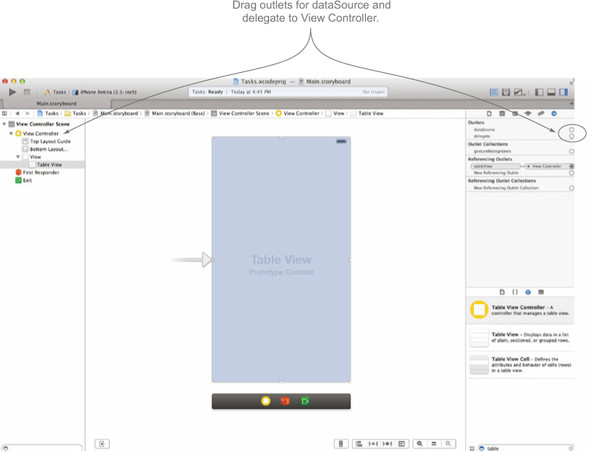
There are two other quick outlets you need to add for your table view before we move on. A table view needs a delegate and a data source to respond to actions and to supply it with data, and you can set this right from the interface editor. Delegates and data sources are very important topics in Cocoa development. We won’t go into detail with them yet, but we will in the next chapter.
To supply a table view with data, you need to conform to its UITableViewDataSource. These protocols have a set of required and optional methods that you need to implement within the class that supplies your table view with the data it needs. For instance, the table view will need to know how many sections there are and how many rows to display within each section. The purpose of the data source is, you guessed it, to supply your table view with data.