concept notification in category ios

This is an excerpt from Manning's book iOS Development with Swift.
Foundation framework of the Core Services layer— Provides additional features and functionality for basic data types. Foundation also adds basic classes and utilities, such as URLs, timers, formatters, and notifications.
Notifications are a way of posting and receiving messages. One object in your app (the publisher) can broadcast notifications, while other objects in your app (observers) listen for the notification.
Did you know that keyboards can change size? iPad keyboards, for example, can be split in two, triggering a keyboard frame change notification. Because all keyboard shows notifications and keyboard hides notifications trigger keyboard frame change notifications, but all keyboard frame changes don’t necessarily trigger keyboard show or hide notifications, UIKeyboardWillChangeFrame is the best notification to listen for.
Each app has its own default Notification Center that is the middleman between the observers and publishers. Your ViewController class can register as an Observer with the Notification Center for keyboard change notifications, and when the UIWindow class broadcasts the keyboard frame change notification to the Notification Center, any registered observers of that notification (your ViewController class, in this case) will be notified (see figure 8.5).
In using the Notification Center as a middleman, the publisher and observers are decoupled—the publisher doesn’t know who’s listening, and the observer doesn’t necessarily know who posted the notification. The decoupling of the publisher and the observer is especially useful with frameworks, such as the frameworks of the iOS SDK. Frameworks know nothing about how your app is structured, but your app still needs a mechanism for receiving important messages from frameworks.

The power to broadcast notifications isn’t limited to the iOS SDK. An object in your app can broadcast notifications too, and observe notifications from elsewhere in your app.
To broadcast a notification, first create a notification name. To help organize your code, it’s probably a good idea to define all your notification names in the same struct. Use the Notification.Name method to generate your notification.
struct Notifications {
   static let TimeOutNotification = Notification.Name("TimeOut")
}
Your publisher then broadcasts the notification with the default Notification Center’s post method:
NotificationCenter.default.post(
   name:Notifications.TimeOutNotification object: nil)
You can use the object parameter to optionally pass a reference to the sender of the notification along with the notification. We’ve left it as nil here.
You can also pass in an optional userInfo parameter with any additional information you’d like to pass with the notification.
This is an excerpt from Manning's book iOS in Practice.
First, let’s look at the types of source code files (.h and .m). Then you’ll see how to tap into that process to get user actions and then act on them. Finally, I’ll briefly talk about notifications as a way to notify any observing objects of something.
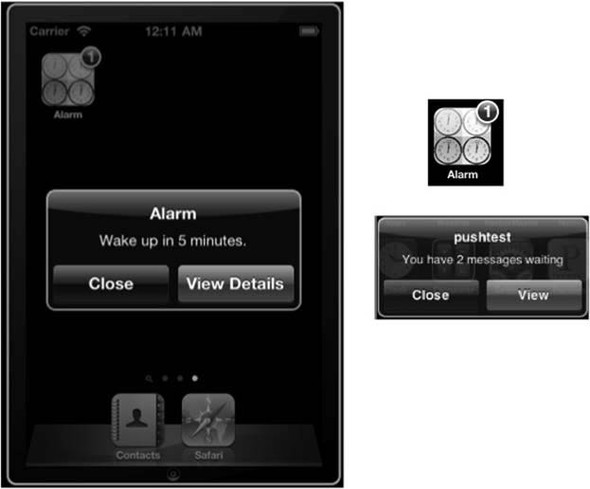
If the app isn’t currently running, the user will see the notification and can open the app. If the app is running, a certain method is called with the notification details, which the app is designed to handle.
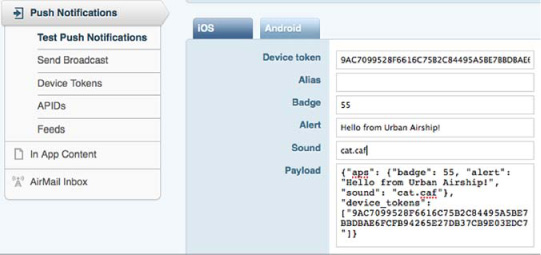
Figure 8.7. Testing push notification to a device via http://urbanairship.com

This is an excerpt from Manning's book iOS 4 in Action: Developing iPhone and iPad Apps.
Events can appear on the iPhone or iPad in three main ways: through bare events (or actions), through delegated events, and through notification. Whereas the methods of our earlier topics all derived from NSObject, event response instead comes from the UIResponder object, whereas notification comes from the NSNotification-Center. You won’t have to worry about accessing responder methods and properties because UIResponder is the parent of most UIKit objects, but the NSNotification-Center requires special access.
In the previous chapter, you learned how to create the basic view controllers that fulfill the controller role of an MVC architectural model. You’re now ready to start accepting user input, because you can send users to the correct object. Users can interact with your program in two ways: by using the low-level event model or by using event-driven actions. In this chapter, you’ll learn the difference between the two types of interactions and how to implement them. Then we’ll look at notifications, a third way that your program can learn about user actions.
As we mentioned in chapter 1, there’s one other way that a program can learn about events: through notifications. When directly manipulating events or actions, as you have throughout this chapter, individual objects receive events because the events occurred in their view, because the events occurred in a subview, or because the events occurred in a view that has been delegated to them.
This is an excerpt from Manning's book iPhone and iPad in Action: Introduction to SDK Development.
Events can appear on the iPhone or iPad in three main ways: through bare events (or actions), through delegated events, and through notification.
Whereas the methods of our earlier topics all derived from NSObject, event response instead comes from the UIResponder object, whereas notification comes from the NSNotificationCenter. You won’t have to worry about accessing responder methods and properties because UIResponder is the parent of most UIKit objects, but the NSNotificationCenter requires special access.
In the previous chapter, you learned how to create the basic view controllers that fulfill the controller role of an MVC architectural model. You’re now ready to start accepting user input, because you can send users to the correct object. Users can interact with your program in two ways: by using the low-level event model or by using event-driven actions. In this chapter, you’ll learn the difference between the two types of interactions, and how to implement them. Then we’ll look at notifications, a third way that your program can learn about user actions.
As we mentioned in chapter 2, there’s one other way that a program can learn about events: through notifications. When directly manipulating events or actions, as you have throughout this chapter, individual objects receive events because the events occurred in their view, because the events occurred in a subview, or because the events occurred in a view that has delegated to them.

This is an excerpt from Manning's book iPhone in Action: Introduction to Web and SDK Development.
There are three main ways that events can appear on the iPhone: through bare events (or actions), through delegated events, or through notification.
In the previous chapter you learned how to create the basic view controllers that fulfill the controller role of an MVC architectural model. You’re now ready to start accepting user input, since you can now send users off to the correct object. Users can interact with your program in two ways: by using the low-level event model or by using event-driven actions. In this chapter, you’ll learn the difference between the two types of interactions. Then we’ll look at notifications, a third way that your program can learn about user actions.
As we mentioned in chapter 10, there’s one other way that a program can learn about events: through notifications. When directly manipulating events or actions, as we have throughout this chapter, individual objects receive events because the events occurred in their view, because the events occurred in a subview, or because the events occurred in a view that has delegated to them.
