concept statement in category ios

This is an excerpt from Manning's book Hello Swift!: iOS app programming for kids and other beginners.
Another reason why using too many else if statements is a bad idea is that code like this makes your app slower. You want a cleaner, more readable way of doing things. How? You can use the switch statement.

This is an excerpt from Manning's book iOS Development with Swift.
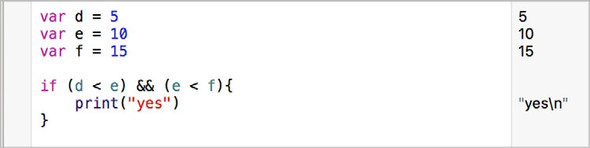
You can also test a condition at the end of each loop with the repeat-while loop. Note also that parentheses around the condition of an if statement are optional. Braces around an if statement’s block of code, on the other hand, are never optional in Swift.

This is an excerpt from Manning's book Anyone Can Create an App: Beginning iPhone and iPad programming.
Great! Now I’m back to having four items on my list. What if I wanted to print out each item on my list? I could use a print() statement for each item, or I could use what’s called the for statement.
The for statement is used when you want to iterate through an array—move through the values in the array one item at a time. The syntax is straightforward: for item in array { }, where array is the name of your array and item is the variable name that you want to use for the items. An example would make this clearer. Add the following to your playground:
for item in shoppingList {
  print(item)
}
This for statement is iterating through your shopping list starting with index 0 (the first item in the array). It assigns the value of the item stored to the variable named item and then prints out the item. It prints this out for each item in your array. This is much easier than writing four print() statements. You can name the variable anything you want. Try changing the word item to x, for example:
for x in shoppingList {
  print(x)
}
You’ll notice that nothing changed—you got the exact same results. You can use any variable name in the for statement.
This is an excerpt from Manning's book Objective-C Fundamentals.
The second set of statements allows code external to this class to tell you which specific UILabels you should be using. Finally, you specify that your class responds to two messages called callHeads and callTails. These messages inform you when the user has called heads or tails and a new coin toss should be initiated.
Once you’ve calculated one value, you may want to compare it against another. Relational operators allow this comparison, which results in a Boolean value being calculated that indicates the truth of the statement. Table B.3 outlines the available relational operators.
The if-else statement is the simplest of the conditional statements. It evaluates a single Boolean expression and executes one set of statements if it evaluates to true and another set of statements if it evaluates to false. The general form is as follows:
if (condition) {
     statement block 1
} else {
     statement block 2
}