concept package in category java

This is an excerpt from Manning's book Java SE 11 Programmer I Certification Guide.
Exam objectives covered in this chapter
What you need to know
[2.1] Create executable Java applications with a main method.
The right method signature for the main method to create an executable Java application.
The arguments that are passed to the main method.
[2.2] Compile and run a Java program from the command line.
[2.3] Import other Java packages to make them accessible in your code.
Compiling and executing a Java program using javac and java tools.
Understand packages and import statements. Get the right syntax and semantics to import classes and interfaces from packages in your own classes.
2.4.1 The need for packages
Why do you think we need packages? First, answer this question: do you remember having known more than one Amit, Paul, Anu, or John to date? Harry knows more than one Paul (six, to be precise), whom he categorizes as managers, friends, and cousins. These are subcategorized by their location and relation, as shown in figure 2.5.
Figure 2.5 Harry knows six Pauls!
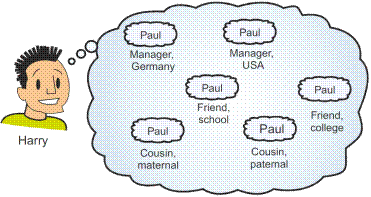
Similarly, you can use packages to group together a related set of classes and interfaces (I will not discuss enums here because they aren’t covered on this exam). Packages also provide access protection and namespace management. You can create separate packages to define classes for separate projects, such as android games and online health-care systems. Further, you can create sub-packages within these packages, such as separate sub-packages for GUIs, database access, networking, and so on.
Note A UML class diagram represents the static view of an application. It shows entities like packages, classes, interfaces, and their attributes (fields and methods) and also depicts the relationships between them. It shows which classes and interfaces are defined in a package. It depicts the inheritance relationship between classes and interfaces. It can also depict the associations between them—when a class or an interface defines an attribute of another type. All UML representations in this chapter are class diagrams. The exam doesn’t cover UML diagrams. But using these quick and simple diagrams simplifies the relationship between Java entities—both on the exam and in your real-world projects.
The package statement can’t appear within a class declaration or after the class declaration. The following code will fail to compile:
class Course {
                             #A
}
package certification;       #B
The following code will also fail to compile, because it places the package statement within the class definition:
class Course {
package com.cert;    #A
}
Also, if present, the package statement must appear exactly once in a class. The following code won’t compile:

This is an excerpt from Manning's book The Java Module System.
One example is the lack of meaningful encapsulation across JARs: all public types are freely accessible by all code in the same application. This makes it easy to inadvertently depend on types in a library that its maintainers considered implementation details and never polished for public use. They likely hid the types in a package called
internalorimpl, but that doesn’t stop us from importing them anyway.
Figure 1.5 The dependency graph Java operates on for any given type coincides with our perception of the type’s dependencies. This graph shows the dependencies of the interface
Futureacross the packagesjava.util.concurrentandjava.lang.
> monitor.persistence/src/main/java/.../StatisticsRepository.java:4:
>     error: package org.slf4j is not visible
>     (package org.slf4j is declared in module org.slf4j.api,
>      but module monitor.persistence does not read it)
A package can be opened by adding a directive
opens ${package}to the module declaration. At compile time, opened packages are strongly encapsulated: there’s no difference between them being opened or not opened. At run time, opened packages are fully accessible, including nonpublic classes, methods, and fields.
This is an excerpt from Manning's book Get Programming with Java.
In Java, a package is a namespace used to group a set of classes together. So far, our application consisted of only one file with one class, but most Java applications consist of many files and many classes. The package allows us to connect these classes together.
When using a package, the package name appears at the very top of your code inside your class file. Java naming standards recommend that the package name is written in all lower-case letters to avoid confusion with any class names. To add a class to a package, use the keyword package followed by the package name, for example:
package packagename;As we continue to create more complicated classes, one of the benefits of Java is the vast amount of code already written and tested that is available for general use. These packages are included in the Java API (Application Programming Interface). The API is a library of packages that can be used in our applications. Most of these packages are designed for handling common programming requirements, such as working with String objects or File objects. This allows us to concentrate on the programming needed to handle the business requirements for our program.

This is an excerpt from Manning's book OCA Java SE 8 Programmer I Certification Guide.
Purpose: Apart from determining the right access modifier that can limit the visibility of a class within a package, this exercise wants you to try out different access modifiers that can be used to declare a class.
The package statement can’t appear within a class declaration or after the class declaration. The following code will fail to compile:

The following code will also fail to compile, because it places the package statement within the class definition:

Also, if present, the package statement must appear exactly once in a class. The following code won’t compile:
If you’ve programmed in languages like C, you might get confused by the command-line parameters. Programming languages like C pass the name of a program as a command-line argument to the main method. But Java doesn’t pass the name of the class as an argument to the main method.
package statement
import javavirtualmachine.*;
package javacompiler;
class EJavaGuru {
    void method1() {}
    int count;
}

This is an excerpt from Manning's book JavaFX in Action.
The outermost construct for imposing order on our code is the package. Packages allow us to relate portions of our code together for convenience, to control access to variables and functions (see access modifiers, later), and to permit classes to have identical names but different purposes. Listing 3.1 shows an example.

Listing 9.2. Util.fx
package jfxia.chapter9; import javafx.scene.Node; package bound function center(a:Node,b:Node,hv:Boolean) : Number { var aa:Number = if(hv) a.layoutBounds.width else a.layoutBounds.height; var bb:Number = if(hv) b.layoutBounds.width else b.layoutBounds.height; return ((aa-bb) /2); } package bound function center(a:Number,b:Node,hv:Boolean) : Number { var bb:Number = if(hv) b.layoutBounds.width else b.layoutBounds.height; return ((a-bb) /2); }
You’ve seen how to import a class from a package, but how do we create our own packages? And what happens if we need to work with two classes that have identical names but live in different packages? The next example will deal with both these issues. But first we need to create a demonstration class.
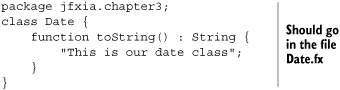
In the example, we have the definition for a class called Date (in the file Date.fx, so the compiler can find it), which does nothing more than return a message when its toString() function is called. The package statement at the head of a source file places the code into jfxia.chapter3, which is the package we want it to live in. Now we need some more code to test it:
Packages are not a heirarchy Despite the misleading impression their names often suggest, Java and JavaFX packages are not arranged in a hierarchy. The package java.awt.event is actually a sibling of java.awt, not a child. If you import all the classes from the latter, you do not automatically get the former. This is a common newbie mistake.
Once we’ve compiled our code, we can bundle the package into a JAR file to make it easy to distribute. A JAR file is a zip archive with a standardized/recognized layout and content. By convention all of the classes in a given package are bundled inside a single JAR. It’s possible to split a package over multiple JARs, but the practice is rarely used. However, JAR archives frequently contains multiple related packages.

This is an excerpt from Manning's book Struts 2 in Action.
Note that the real file in the application contains detailed comments about the various elements. This is true for all the examples in this book, but when we print listings here we’ll remove the comments for clarity. This simple application has only two actions, and one of them hardly does anything. Both the Name and the HelloWorld actions declare some results for their own use. Each result names a JSP page that it will use to render the result page. The only other elements here are the struts root element and the package element. The struts element is the mandatory document root of all Struts 2 XML files and the package element is an important container element for organizing your actions, results, and other component elements.
For now, the only thing we need to note about the package element is that it declares a namespace that’ll be used when the framework maps URLs to these actions. Figure 2.6 shows how the namespace of the package is used to determine the URL that maps to our actions.
You should now realize what an action does, but before we design one, we need to create the packages to contain them. In the next section, we’ll see how to organize our actions into packages and take our first glimpse at the Struts 2 Portfolio application, the main sample application for this book.
Listing 3.2. Declaration of a package
extends="struts-default"> <action name="AdminPortfolio" > <result>/chapterThree/AdminPortfolio.jsp</result> </action> <action name="AddImage" > <result>/chapterThree/ImageAdded.jsp</result> </action> <action name="RemoveImage" > <result>/chapterThree/ImageRemoved.jsp</result> </action> </package>