concept notification in category .net

This is an excerpt from Manning's book Concurrency in .NET.
Today’s challenge for applications isn’t reacting to one event, but reacting to a constant high volume of events in (near) real time. Consider the humble smartphone. We depend on these devices to be constantly connected to the internet and continuously sending and receiving data. These multidevice interconnections can be compared to billions of sensors that are acquiring and sharing information, with the need for real-time analysis. In addition, this unstoppable massive stream of notifications continues to flow from the internet fire hose, requiring that the system be designed to handle back-pressure (https://en.wikipedia.org/wiki/Back_pressure) and notifications in parallel.
Writing applications that are capable of reacting to events at a high rate is becoming increasingly important. Figure 6.3 shows a system that’s processing a massive number of tweets per minute. These messages are sent by literally millions of devices, representing the event sources, into the system that analyzes, transforms, and then dispatches the tweets to those registered to read them. It’s common to annotate a tweet message with a hashtag to create a dedicated channel and group of interests. The system uses a hashtag to filter and partition the notifications by topic.
Figure 6.3 Millions of devices represent a rich source of events, capable of sending a massive number of tweets per minute. A real-time reactive system can handle the massive quantities of tweets as an event stream by applying non-blocking (asynchronous) operations (
merge,filter, andmap) and then dispatching the tweets to the listeners (consumers).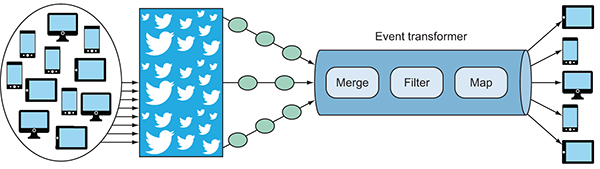
Every day, millions of devices send and receive notifications that could overflow and potentially crash the system if it isn’t designed to handle such a large number of sustained events. How would you write such a system?
Let’s see an example to better understand how F# event combinators work and how they can easily be consumed by other .NET programming languages. Listing 6.1 shows how to implement a simple game to guess a secret word using F# event combinators. The code registers two events: the
KeyPressevent from the WinForms control passed into the construct ofKeyPressedEventCombinators, and theElapsedtime event fromSystem.Timers.Timer. The user enters text—in this case, only letters are allowed (no digits)—until either the secret word is guessed or the timer (the given timeinterval)has elapsed. When the user presses a key, the filter and event combinators transform the event source into a new event through a chain of expressions. If the time expires before the secret word is guessed, a notification triggers a “Game Over” message; otherwise, it triggers the “You Won!” message when the secret word matches the input.Listing 6.1 F# Event combinator to manage key-down events
type KeyPressedEventCombinators(secretWord, interval,
➥ control:#System.Windows.Forms.Control) =
    let evt =
 let timer = new System.Timers.Timer(float interval)   #1
 let timeElapsed = timer.Elapsed |> Event.map(fun _ -> 'X')   #2
        let keyPressed = control.KeyPress
                       |> Event.filter(fun kd -> Char.IsLetter kd.KeyChar)
 |> Event.map(fun kd -> Char.ToLower kd.KeyChar)   #3
 timer.Start()   #1

        keyPressed
 |> Event.merge timeElapsed   #4
        |> Event.scan(fun acc c ->
            if c = 'X' then "Game Over"
            else
                let word = sprintf "%s%c" acc c
                if word = secretWord then "You Won!"
                else word
 ) String.Empty   #5

    [<CLIEvent>]
 member this.OnKeyDown = evt   #6

#1   Creates and starts a System.Timers.Timer instance
#2   The map function from the Event module registers and transforms the timer event to notify char ‘X’ when it triggers.
#3   Registers the KeyPress event using the F# Event module to filter and publish only lowercase letters
#4   Merges the filters to handle as a whole. When either the event timer or keypress is triggered, the event fires a notification.
#5   The scan function maintains an internal state of the keys pressed and pushes the result from every call to the accumulator function.
#6   Exposes the F# event to other .NET programming languages through the special CLIEvent attribute
This is an excerpt from Manning's book Microservices in .NET Core: with examples in Nancy.
To give you a feel for what I mean by supporting technical capabilities, let’s consider two examples: an integration with another system, and the ability to send notifications to customers.
As part of the registration process, customers can choose to be notified by email, SMS, or, if they have the company’s mobile app, push notification. This introduces some complexity in the Loyalty Program microservice in that it must not only choose which type of notification to use but also deal with how each one works. As a first step, you’ll introduce a supporting technical microservice for each notification type. This is shown in figure 3.9.
Figure 3.9. To avoid bogging down the Loyalty Program microservice in technical details for handling each type of notification, you’ll introduce three supporting technical microservices, one for each type of notification.
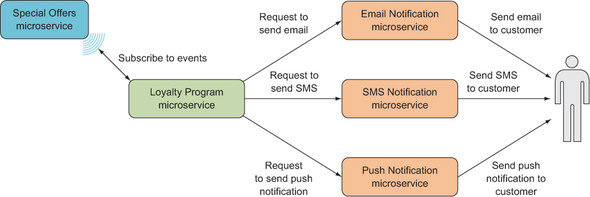
This is better. The Loyalty Program microservice doesn’t have to implement all the details of dealing with each type of notification, which keeps the microservice’s scope narrow and focused. The situation isn’t perfect, though: the microservice still has to decide which of the supporting technical microservices to call for each registered customer.
This leads you to introducing one more microservice, which acts as a front for the three microservices handling the three types of notifications. This new Notifications microservice is depicted in figure 3.10 and is responsible for choosing which type of notification to use each time a customer needs to be notified. This isn’t really a business capability, although it’s less technical than dealing with sending SMSs. I consider the Notifications microservice a supporting technical microservice rather than one implementing a business capability.
Figure 3.10. To remove more complexity from the Loyalty Program microservice, you’ll introduce a Notifications microservice that’s responsible for choosing a type of notification based on customer preferences. Introducing this microservice has the added benefit of making notifications easier to use from other microservices.
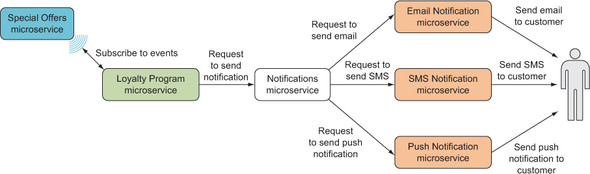
This example of a supporting technical capability differs from the previous example of the ERP integration in that other microservices may also need to send notifications to specific customers. For instance, one of the functionalities of the point-of-sales system is to send the customer an electronic receipt. The microservice in charge of that business capability can also take advantage of the Notifications microservice. Part of the motivation for moving this supporting technical capability to separate microservices is that you can reuse the implementation.

This is an excerpt from Manning's book Continuous Integration in .NET.
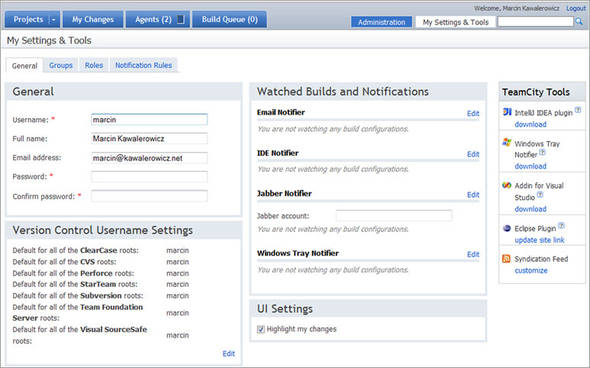
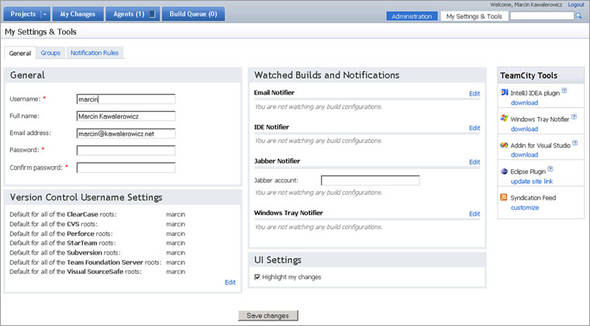
A build notification tells you the results of a build. Did it succeed? Did it fail? And if it failed, why? And which module caused the failure? CI servers have a rich notification repertoire. Windows tray icons, emails, instant messaging, and IDE plug-ins are just some of the possibilities. It’s a proof for the thesis that build notification is one of the most important parts of CI.