A channel is one component of an image’s representation. In RGB, separate channels store red, green, and blue values; alpha adds transparency. A pixel’s color can therefore be processed as several simpler numeric values instead of one packed color. section 8.3.3 section 12.4.1
Channel count and depth determine what image data can represent:
- An 8-bit RGB image uses three bytes per pixel, with 256 possible values in each channel and 16,777,216 possible color combinations. section 12.4.1
- A one-channel image stores one value per cell; values from 0 through 255 can represent different darkness levels in an 8-bit depth image. section 12.4.1
- Medical imagery commonly uses 16-bit channels for greater precision, while satellite imagery may use many channels for visible and nonvisible wavelengths. section 12.4.1
Interpolating a bitmap channel by channel
A packed 32-bit RGBA or ARGB color cannot be safely scaled and added as one number. Split it into four eight-bit channels, interpolate each channel separately, then combine the results. For an opaque image, interpolate only red, green, and blue to obtain a continuous color function F(x, y) → (R, G, B). section 8.3.3
Figure 12.19 An example of an 8-bit, 1-channel depth image. Each cell contains a number from 0 to 255. The lower the number is, the darker the pixel.
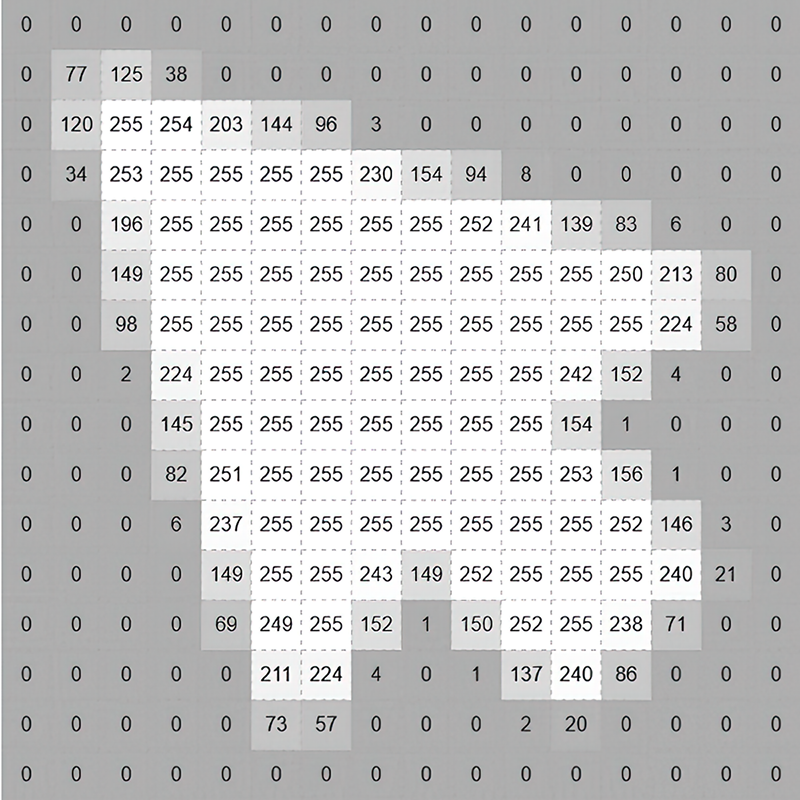
View the one-channel grid example, where each cell contains a value from 0 to 255 and brightness follows the stored value. section 12.4.1