The additive color model describes color as light. Start with darkness, add colored light, and the result gets brighter; combine enough light and you reach white. That makes it the natural model for screens, rather than for paint, ink, or other physical pigments. section 4.1 section 4.1.1
Its primary colors are red, green, and blue (RGB). Overlap two primaries and you get a secondary color: red plus green makes yellow, red plus blue makes magenta, and green plus blue makes cyan. Bring all three together and the overlap is white. Elementary-school paint primaries, kindly step aside. section 4.1.2
Figure 4.5 To prove to myself and to you that red, green, and blue are truly the primary colors of light, I had a little photo shoot with my new set of colored flashlights. Around the outside, you can see the primary colors, and then inside, where two overlap, you can see the secondary colors. Finally, in the center where all three lights overlap, you can see the white light. Nifty!
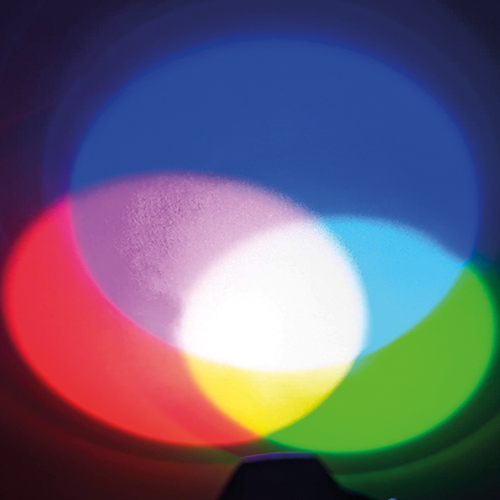
Use the flashlight overlaps to see the model at work: RGB lights sit around the edge, secondary colors appear where pairs meet, and white appears at the center. section 4.1.2
A rainbow offers the reverse view. Sunlight is essentially white, but a prism or water droplet bends different wavelengths by different amounts, separating that white light into visible colors. Put the components together again, and additive mixing heads back toward white. section 4.1.1
For digital visualization, the practical implications are straightforward:
- Think in RGB when selecting colors for a monitor or other screen-based output. section 4.5
- Treat RGB values as adjustable amounts of red, green, and blue light; for example, (0,255,255) represents cyan. section 4.2.1
- Keep additive and subtractive models distinct: CMY/CMYK is associated with print, where combining pigments yields less reflected light. section 4.1.3
- Use color purposefully, and add labels when meaning may not be clear or inclusive for every viewer. section 4.5
From RGB numbers to a screen color
An RGB color is commonly written as three values from 0 to 255, one for each light primary. Cyan can be written as (0,255,255): no red, full green, and full blue. The same values can also be written as hexadecimal triplets, a compact notation enabled by the byte-sized channels used by computer displays. section 4.2.1
