A robot shell is a custom interactive REPL for sending movement commands directly to robot hardware. It accepts terminal input, maps commands such as forward and backward to motor-control functions, and keeps running until the user exits. section 4.0 section 4.5
Built with Python’s cmd framework, a shell subclass defines do_ methods for each command and starts its read–evaluate–print loop with cmdloop(). A prompt, welcome message, help, tab completion, and command history make repeated physical control quick to use. section 4.2 section 4.5
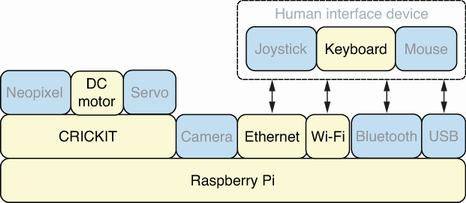
Commands travel from keyboard input on the Raspberry Pi through the shell and CRICKIT board to signals that drive the DC motors. section 4.3
Movement commands can be extended without changing the shell loop:
- Parse text following forward or backward as an optional duration; call the motor function without it to retain default behavior. section 4.6
- Handle EOF with do_EOF returning True, allowing CTRL+D to close the shell cleanly. section 4.6
- Centralize duration and speed parsing in a helper, then reuse it for forward, backward, left, right, spin_left, and spin_right. section 4.8
Run a saved movement sequence
Put commands such as spin_right, left, and forward 0.2 3 in move.txt, then run cat move.txt | shell.py. The shell processes each line as a command; precmd can print each command before it executes. section 4.8
