Alt text is a short description associated with an image or other non-text content. It appears when an image cannot load and is read aloud by screen readers, giving people who cannot see the visual a way to understand its purpose. section 7.3.4
Make alt text useful rather than merely present:
- Write one concise sentence describing what the visual is, including its chart type when relevant. section 7.3.4
- Describe the information a user needs from the image, not its filename; a file name is rarely helpful. section 7.3.4
- Link nearby to a CSV or plain tabular version when people may need to explore detailed chart data. section 7.3.4
- Add alt text whenever the platform provides the opportunity, including social posts, reports, and HTML images. section 7.3.4
A chart with a useful description
For a bar graph, replace the unhelpful default filename with a short, accurate description of the graph and its message. Keep the detailed values in a nearby CSV or table rather than forcing a screen reader user through an overloaded sentence. section 7.3.4
Figure 7.12 Two versions of alt text for the bar graph from figure 7.11, without the tooltip. Even though it is often the default, showing the file name is neither helpful nor necessary; instead, a concise and accurate description ensures accessibility and inclusivity for those using screen readers and other assistive technology.
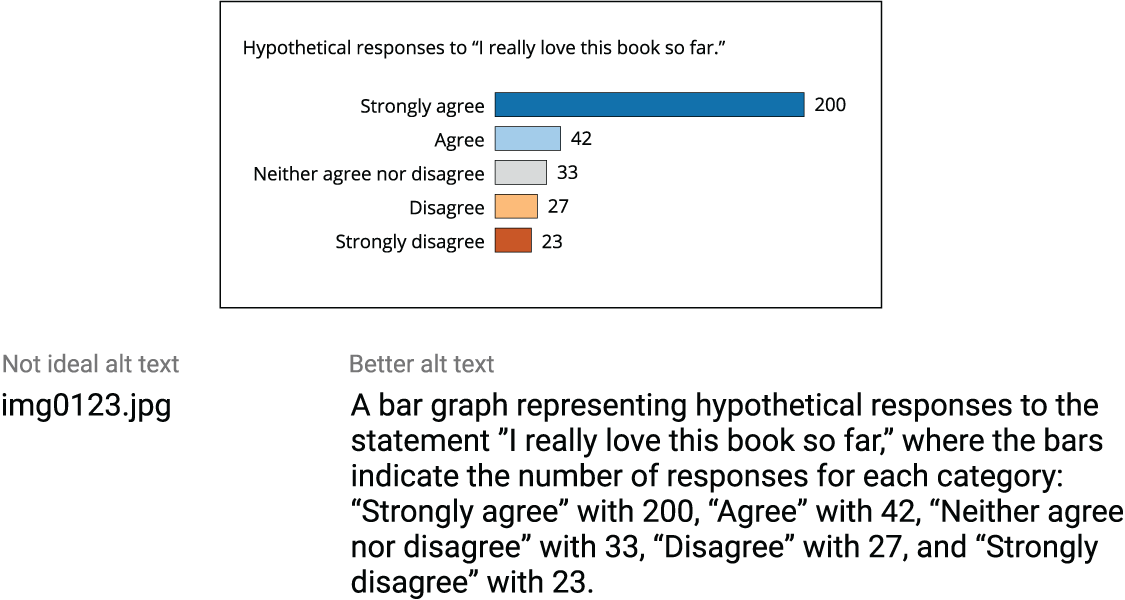
Compare two versions of alt text for the same bar graph and see why concise, accurate description beats displaying the file name. section 7.3.4



