Amazon CodeWhisperer is an AWS programming assistant that works inside an IDE, using comments and source context to suggest code while keeping development in the editor. section 2.4 section 2.5
A practical CodeWhisperer workflow looks like this:
- Disable competing Copilot extensions, restart the application, install or configure CodeWhisperer, and sign in to a developer account. section 2.3
- Create a Python file and express the programming task in a comment or prompt; more specific prompts produce output closer to the intended solution. section 2.3 section 2.4
- Accept suggestions as they unfold method by method, recognizing that the tool advises within the IDE rather than generating an entire project from a tiny prompt. section 2.4
- Inspect the interpretation of requirements, especially conventions such as whether k means an array index or an element rank. section 2.3
Generating Quickselect
A prompt asking for the kth smallest element without full sorting leads to a partition-based Quickselect implementation. The demonstrated Python example partitions around a pivot, recurses into the relevant side, and returns 2 for k = 2 in [5, 2, 4, 6, 1, 3]. Here, k is treated as the zero-based index of the sorted result, so the output is the third-smallest element. section 2.3
Figure 2.3 Before we can switch to CodeWhisperer, we must disable Copilot. We turn off the extension in the Extensions tab.
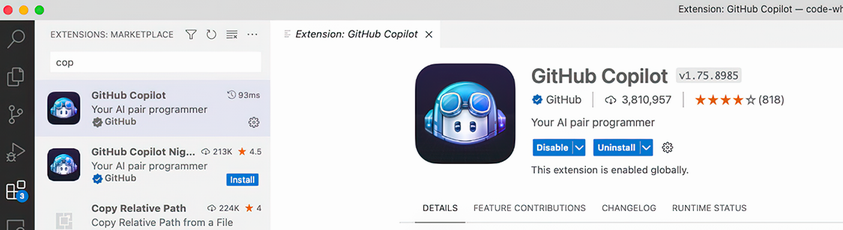
Use the setup figure to locate the IDE extension controls needed before switching from Copilot to CodeWhisperer. section 2.3
