liveBook · Manning

Analogous colors

As explained in Design for Developers

An analogous color scheme uses colors positioned next to one another on the color wheel.

An analogous color scheme uses three colors next to one another on the color wheel. The result is harmonious and cohesive rather than intensely contrasting. section 9.2.1

This low-contrast approach can make an interface feel calm and elegant, but color alone may not distinguish chart data or interface states. Add patterns, icons, labels, or other context where meaning matters. section 9.2.1 section 9.9

From sunsets to dashboards

A sunset can move through yellows, oranges, and reds, demonstrating how neighboring hues blend naturally. A dashboard can use a similar palette for a cohesive appearance, while patterns or labels preserve distinctions between chart values. section 9.2.1
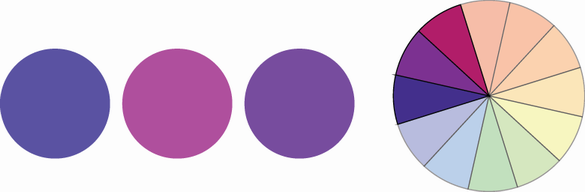
Figure 9.12 This is an example of an analogous color scheme with varying shades of purple.

View an analogous palette built from varying shades of purple. section 9.2.1

How Design for Developers covers it

How deep it goes
Defines the three-color relationship and explains its visual effect, but stops short of detailed implementation steps.
Examples
Uses sunsets, purple shades, and dashboard charts to demonstrate analogous palettes and their limitations.
What it assumes
Assumes no specialized color theory beyond learning to identify neighboring colors on a color wheel.
What you can do after
Apply neighboring hues to choose harmonious palettes while adding non-color cues where users must distinguish information.
How it connects
Connects analogous colors to the color wheel, complementary color schemes, accessibility, contrast testing, and information encoding.

Also explained in

Compare how 3 books explain analogous colors →

Related concepts

This explainer was generated by Manning's knowledge graph from the text of Design for Developers. The section links point to the parts of the book it draws on.

