The anchor element, written with opening and closing a tags, creates a hypertext link around content. Its href attribute supplies the destination, usually a local filename or a remote URL. section 2.15 section 2.16
Choose the destination type that matches where the link should go:
- Link to a local page with a filename such as wordplay.html when the files share a directory. section 2.15
- Link to another website with its full URL. section 2.15
- Link to a location on the same page by giving that location an id and prefixing its value with # in href. section 16.7
- Check capitalization carefully in filenames, directory names, and URLs; a case mismatch can lead to a 404 Not Found error. section 2.15
A tiny working link
Write <a href="wordplay.html">Wordplay</a> to make the word “Wordplay” clickable and point it to a local page. Keep the href value in quotation marks so the destination is easy to read. section 2.15 section 2.2
Figure 2.7 The syntax to use for the <a> tag
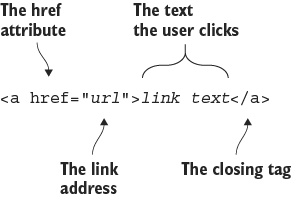
Use the syntax figure to see how the opening tag, href attribute, linked content, and closing tag fit together. section 2.15



