An angle measures rotation or direction where two rays or line segments meet at a vertex. A full turn is 360 degrees, or 2π radians; 180 degrees equals π radians. In browser coordinate systems, directions commonly begin at the positive x-axis and increase clockwise because y values increase downward. section 1.4.7 section 10.1
Angles turn positions into useful UI behavior. CSS can rotate an element with `transform: rotate(45deg)`. JavaScript can use an angle with sine and cosine to place a point around a center: `x = centerX + r * Math.cos(angle)` and `y = centerY + r * Math.sin(angle)`. This supports radial menus, circular motion, arcs, and directional movement. section 1.4.7 section 9.1.1 section 1.4.8
When a pointer supplies a direction, calculate its angle from center-relative coordinates:
- Find the center of the element or canvas, then subtract it from the pointer position to get `deltaX` and `deltaY`. section 10.2.3 section 13.2.2
- Use `Math.atan2(deltaY, deltaX)` to convert that vector into an angle in radians. section 13.2.2 section 14.1.3
- Convert radians when a degree-based transform is needed: `degrees = radians * (180 / Math.PI)`. section 13.2.2
- Normalize or limit the resulting angle when an interaction has a permitted arc, such as a knob range or chart slices. section 13.2.2 section 14.1.3
Map data to pie-chart slices
A pie chart assigns each value its share of a complete turn: `sliceAngle = (value / total) * 2 * Math.PI`. Draw each canvas arc from the current angle to `currentAngle + sliceAngle`. For a readable label position, use the slice’s middle angle with cosine and sine. Starting at `-Math.PI / 2` places the first slice at 12 o’clock rather than 3 o’clock. section 14.1.1
Build a rotary control
A dial converts a cursor location into an angle, then maps that angle to a value range. Compute the cursor vector from the knob center, call `Math.atan2(deltaY, deltaX)`, convert to degrees, and apply `rotate(angle)`. Clamp the angle between minimum and maximum bounds before converting it to a control value. section 13.2.2
Figure 14.3 An interactive, canvas-based donut chart of the composition of seawater. When the user hovers their pointer over a slice, a text element displays information about the data that underlies the slice.
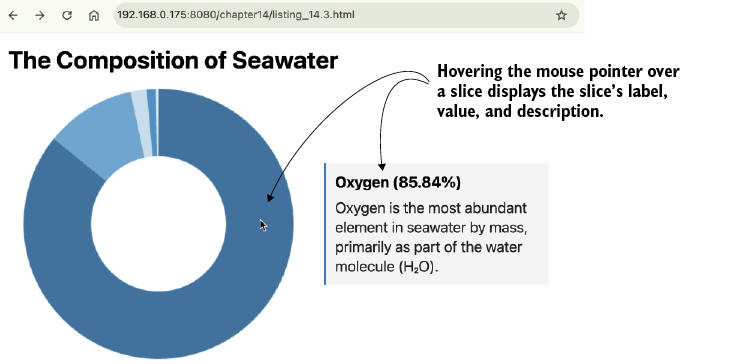
Use polar coordinates—distance and angle from the center—to identify the hovered donut slice instead of testing a rectangular region. section 14.1.3

