Anthos on bare metal runs Anthos Kubernetes clusters on customer-provided Linux servers without requiring VMware. Despite its name, the servers may be physical machines or virtual machines on a supported alternative platform. The organization supplies and patches the operating system; Anthos supplies cluster networking, lifecycle management, diagnostics, health checks, logging, and monitoring. This “bring your own Linux” model can reuse standard hardware and OS images, but shifts more host preparation to the operations team. section 17.0 section 17.1 section 17.2
Choose a cluster model and size it for both management and applications:
- An admin cluster manages installation, updates, upgrades, and deletion of user clusters through an operator and Cluster and NodePool resources. User clusters host applications on control plane and worker nodes. Standalone deployment combines admin and user roles in one cluster; hybrid and separate admin/user deployments are also available. section 17.2.1 section 17.6
- For production, plan high availability: at least three control plane nodes for an HA control plane and at least two worker nodes for HA applications. A single control plane node is a nonproduction choice. Add application capacity and allow for node loss during upgrades when zero downtime is required. section 17.2.1 section 5.4 section 17.3.2
- Choose bundled or external, manual load balancing. Bundled mode uses HAProxy for the control plane and MetalLB for workloads. Plan durable storage separately: the default local-host option is appropriate only for development clusters. section 17.6 section 5.4
Before deployment, verify hardware and supported OS configuration, synchronize node clocks with NTP, and prepare root SSH access. RHEL and CentOS need appropriate firewalld rules; Ubuntu requires the Uncomplicated Firewall service to be disabled. Prepare the Google Cloud project’s APIs and service accounts as well: missing APIs stop the preflight check, and distinct service accounts avoid concentrating roles in one account. Automating vetted, patched OS images—potentially through PXE boot—helps keep replacement nodes compatible. section 17.3 section 17.3.1 section 17.3.5 section 5.4
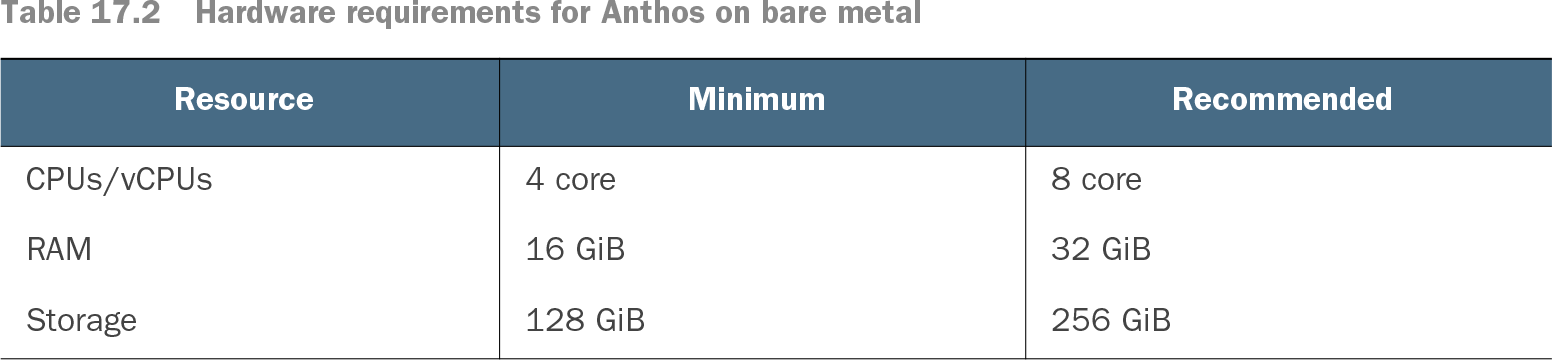
Table 17.2 Hardware requirements for Anthos on bare metal (view table figure)
Use the default-profile per-node CPU, memory, and storage figures as a baseline, then add capacity for applications and the chosen cluster model. section 17.3.2
Create the first cluster
Download bmctl for the selected version, make it executable, and generate a template with `bmctl create config -c CLUSTER_NAME --project-id=CLOUD_PROJECT_ID`. Replace the placeholders and edit the configuration for node addresses, control plane, load balancer, storage, and credentials. Run `bmctl create cluster -c CLUSTER_NAME`. The tool validates the configuration, checks hosts and connectivity, provisions nodes, and installs add-ons. Subsequent user clusters can be created from user-cluster configuration files. section 17.4.1
An edge deployment can keep latency-sensitive inference near its data source while sending metadata to Google Cloud for analytics and model training. One smart-retail design routes checkout video over 5G to an Anthos bare metal cluster at a telecom edge, then returns a queue-management notification to the store. That architecture is a use case, not a requirement for cluster placement. section 8.3.3 section 7.5.1