liveBook · Manning

Aperture

As explained in Web Design Playground

The open or partially enclosed negative space in a letterform, especially where strokes do not fully close a counter.

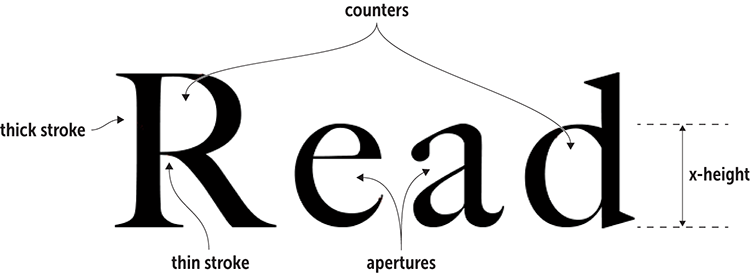
An aperture is the partly enclosed negative space inside a letterform. In letters such as C, S, a, and e, a larger opening usually makes the character easier to recognize, especially on a small screen. section 20.3

When auditioning a typeface, look for:

  • Large apertures, which help letterforms remain readable. section 20.3
  • A useful balance with counters, x-height, and stroke contrast. section 20.3

Try it with Google Fonts

Open a typeface in Google Fonts, type sample text, and compare how clearly letters such as a and e appear at small sizes. Remember that a and e contain both a counter and an aperture: enlarging one can reduce the other. section 20.3
20_02.png

Use the figure to compare apertures alongside the other visual features that support small-screen readability. section 20.3


How Web Design Playground covers it

How deep it goes
Defines apertures, identifies letter examples, and relates them to counters and x-height without explaining font construction internals.
Examples
Uses C, S, a, and e, plus Google Fonts sample-text comparisons, to demonstrate apertures.
What it assumes
Teaches counters, x-height, and stroke contrast alongside aperture rather than assuming their definitions.
What you can do after
Evaluate typefaces in Google Fonts for aperture size and small-screen legibility.
How it connects
Connects apertures with counters, x-height, stroke contrast, typefaces, and legibility.

Also explained in

Compare how 2 books explain aperture →

Related concepts

This explainer was generated by Manning's knowledge graph from the text of Web Design Playground. The section links point to the parts of the book it draws on.