An aperture is the partially enclosed negative space inside a letterform. In letters such as C, S, a, and e, a larger aperture generally makes the character easier to read, especially on small screens. section 20.3
When auditioning typefaces for a small-screen page, look for:
- Large apertures for open, readable letterforms. section 20.3
- A generous x-height, which often accompanies larger counters and apertures. section 20.3
- Low to medium stroke contrast, so thin strokes do not disappear. section 20.3
Apertures and counters can trade places
Letters such as a and e contain both a counter and an aperture. A larger counter can imply a smaller aperture, and vice versa, so a healthy x-height helps both features render clearly. section 20.3
Figure 20.2 When deciding on a typeface that will render well even on small displays, look for larger counters and apertures, good x-height, and low stroke contrast.
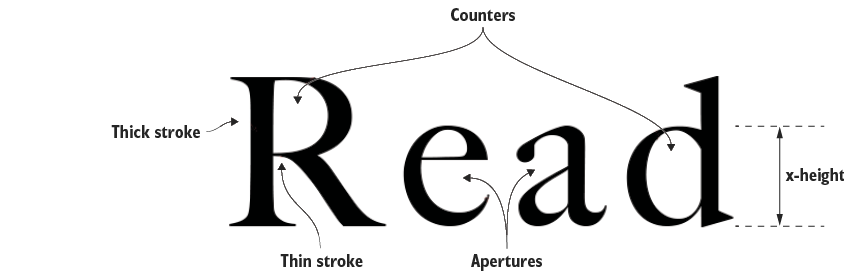
Compare the letterforms visually: the figure highlights larger counters and apertures, stronger x-height, and restrained stroke contrast as small-display criteria. section 20.3

