Imagine keeping room for every order a shop might receive on its busiest day. Most days, nearly all that space would sit empty. Allocating only enough room for an ordinary day creates the opposite problem: what happens when more orders arrive? Array resizing handles this tradeoff by replacing an array with one of a different capacity and transferring its elements. section 5.2 section 5.11
A dynamic array manages this replacement for you. Underneath, it still uses a fixed-size array; it cannot make that array larger in place. Resizing therefore costs time to copy elements and temporarily needs space for the replacement array. The useful trick is to resize infrequently rather than on every change. section 5.2 section 5.3
A practical growth-and-shrink policy is:
- Start with capacity one unless an initial capacity is specified. When an insertion finds the array full, create an array with twice the capacity and copy the existing elements before inserting. section 5.14 section 5.16
- After a deletion, halve capacity when no more than a quarter of the slots are occupied. Waiting that long avoids repeatedly growing and shrinking when the array hovers around half full. section 5.12 section 5.13 section 5.18
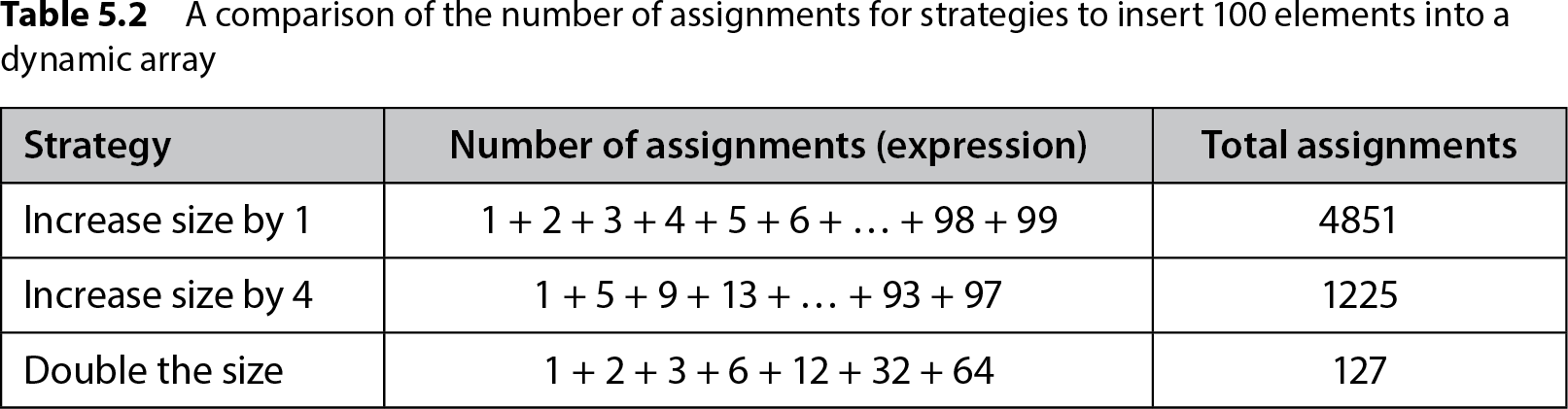
Table 5.2 A comparison of the number of assignments for strategies to insert 100 elements into a dynamic array (view table figure)
| Strategy |
Number of assignments (expression) |
Total assignments |
|---|---|---|
| Increase size by 1 |
1 + 2 + 3 + 4 + 5 + 6 + … + 98 + 99 |
4851 |
| Increase size by 4 |
1 + 5 + 9 + 13 + … + 93 + 97 |
1225 |
| Double the size |
1 + 2 + 3 + 6 + 12 + 32 + 64 |
127 |
Compare the element-copying costs of growing by one slot, growing by four slots, and doubling capacity across 100 insertions. Doubling makes room for more insertions between copies; growing by one repeatedly copies nearly the entire array. section 5.10
Resizing before an insert
An insert checks whether the backing array is full. If so, a `_double_size()` helper saves the old array, allocates one with twice the capacity, and copies each occupied element. The insert can then write into the next free slot. An insert that triggers this resize takes O(n) time and O(n) extra space; one that does not resize uses constant time and extra space. Across n insertions, doubling limits the total element-copying overhead to O(n). section 5.16 section 5.10
Shrinking saves space, but deletion has costs beyond resizing. Deleting by value first searches for the element; preserving order then requires shifting later elements left. Even without a resize, that version can take O(n) time. Choose the resizing policy and deletion behavior for the changes your data actually undergoes. section 5.18 section 5.3