ASP.NET Core Identity provides user accounts for an ASP.NET Core application. It handles much of the work of storing users, validating passwords, and signing people in and out. Authentication establishes who a user is; authorization decides what that user may do. Identity handles the account and authentication work, but an application still needs a user interface and any rules that control access. section 23.0 section 23.2
By default, Identity uses Entity Framework Core (EF Core) to store users and their claims. It hashes passwords rather than storing them directly. Its services also support account lockout, password-reset tokens, and multifactor authentication (MFA); features such as sending email and connecting external sign-in providers need additional application setup. section 23.2 section 23.1.2
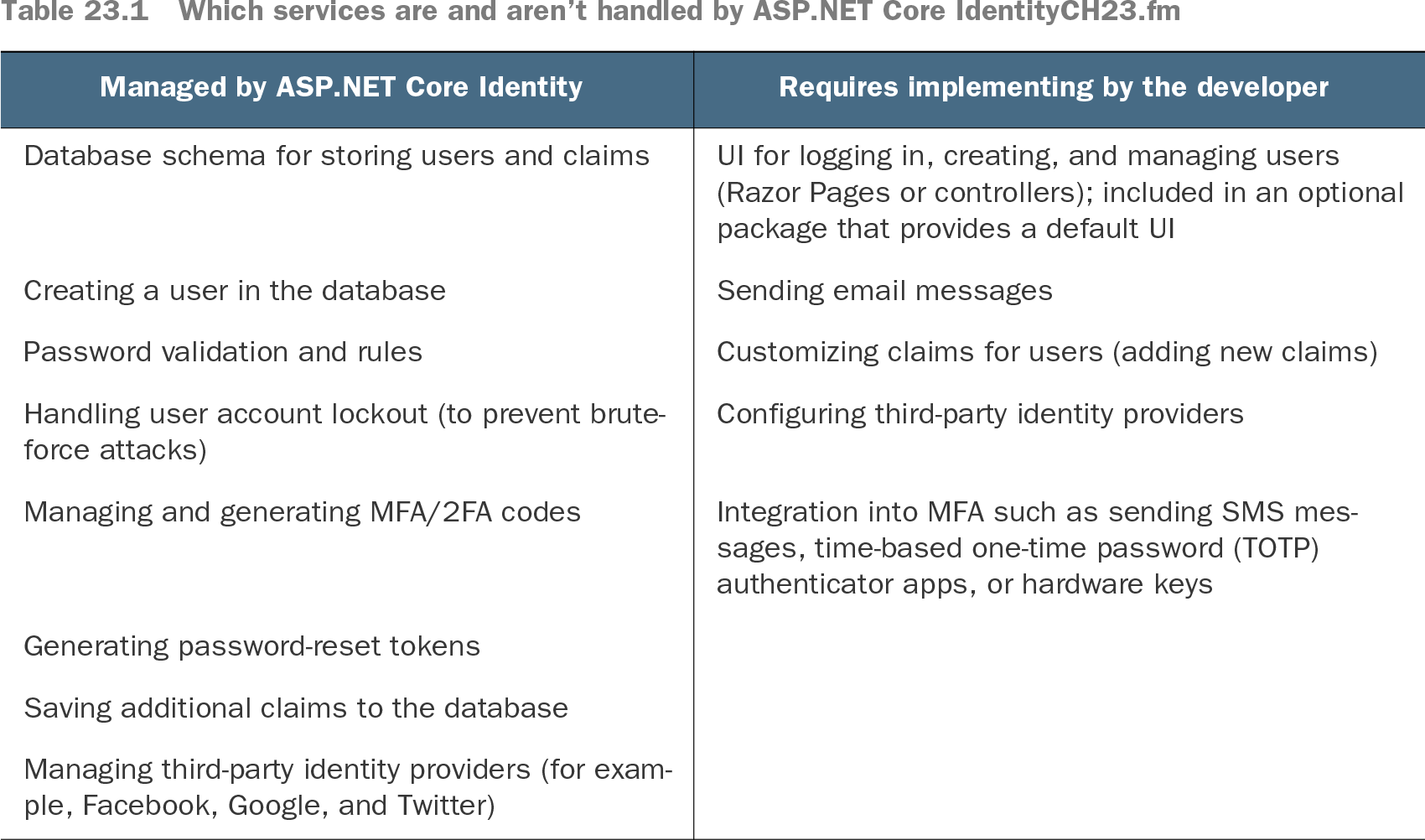
Table 23.1 Which services are and aren’t handled by ASP.NET Core IdentityCH23.fm (view table figure)
Use the service comparison to distinguish what Identity supplies from the UI, messaging, and integrations you must provide or configure. section 23.2
On login, SignInManager loads the user, checks the password, creates a ClaimsPrincipal, and sets HttpContext.User. It also writes an encrypted authentication cookie. On later requests, ASP.NET Core reads that cookie to restore the principal, so the user does not enter a password each time. Authentication middleware must run before middleware that needs the signed-in user, such as authorization middleware. section 23.1.2 section 23.7
There are two practical ways to start:
- For a new Razor Pages app, choose Individual Accounts in the Visual Studio template or run dotnet new webapp -au Individual. Apply the included EF Core migrations with dotnet ef database update before registering a user. The Visual Studio template uses LocalDB; the CLI template defaults to SQLite. section 23.3.1
- For an existing EF Core app, add Microsoft.AspNetCore.Identity.EntityFrameworkCore and Microsoft.AspNetCore.Identity.UI, register Identity with the existing DbContext, derive that context from IdentityDbContext<TUser>, then create and apply a migration. Add links to the default UI in the Razor Pages layout. section 23.4 section 23.4.1 section 23.4.2
The optional default UI supplies Razor Pages for registration, login, and account management. Its pages live in an Identity area and can be overridden individually. A generated app includes Register and Login links; try creating an account and signing out to check the setup. Email confirmation, MFA, and external logins need further configuration before relying on them. section 23.3.2 section 23.3.4
Add a name at registration
If registration needs a full name, add a Name input to the registration page. After UserManager creates the account, call AddClaimAsync with a FullName claim. A Razor Page can then read it with User.FindFirstValue("FullName"). For a user-editable name, adding a property to the user entity is another option. section 23.6
Keep account policy explicit. For example, Identity options can require a confirmed account, enable lockout, and set password requirements. A generated confirmation page alone does not mean email delivery has been configured. section 23.3.4