An open-world game may have assets needed everywhere and others needed only in one zone. Unity asset bundles let you group those assets separately: keep shared assets available while loading and unloading zone assets as the player moves. section 7.2.4
A bundle contains the assets assigned to it. Unity can extract a specific asset without decompressing the entire bundle. Unlike the Resources folder, bundles provide separate groups for assets with different loading needs. section 7.2.4 section 7.2
For a game with multiple zones:
- Put assets used across zones, such as menus and the player character, in a common bundle. section 7.2.4
- Put each zone’s remaining assets in its own bundle. Load the common bundle at startup and retain it; load and unload zone bundles as needed. section 7.2.4
Figure 7.10 Asset bundles make it easy to manage our memory. We can load the common bundle first and keep it in memory at all times. Then we can load each zone’s bundle separately.
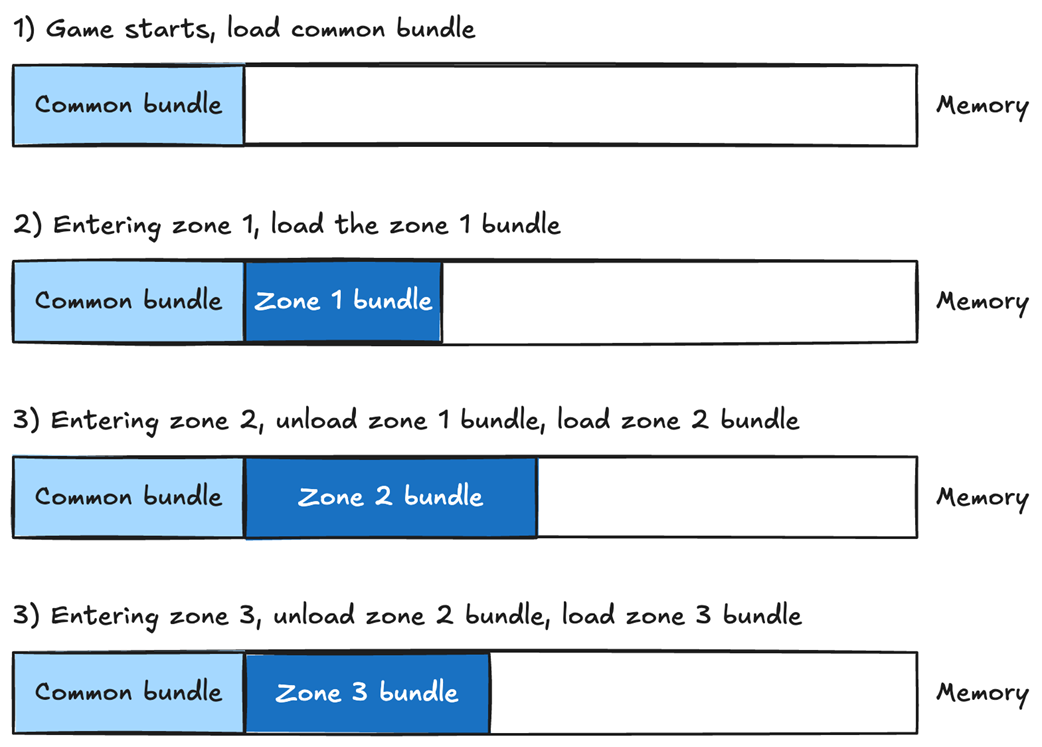
The diagram shows the common bundle staying in memory while zone bundles are loaded separately. section 7.2.4
Choose bundles for the loading problem you actually have. Retrieving assets from them adds processing, and unused assets can remain in a bundle unnoticed. Downloading bundles from a server also requires your own download and validation code; Addressables wraps bundles and handles local or server loading and unloading. section 7.2
