When projects share one set of Python packages, they can run into trouble: a chatbot and a web scraper might need different versions of the same library. Isolation gives each project its own virtual environment—its own toolbox of installed packages—so installing something for one project does not change the other. section 6.1
Figure 6.1 Without virtual environments (right), all projects share the same packages, which can cause version conflicts. With virtual environments (left), each project gets its own isolated set of packages, keeping everything clean and conflict-free.
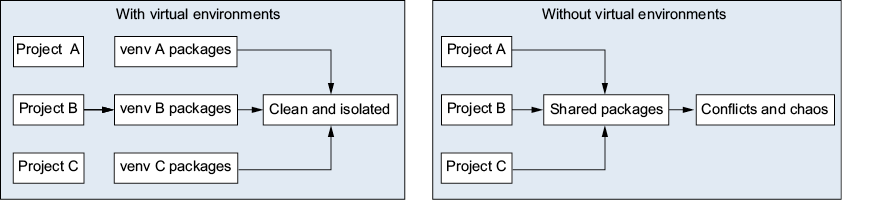
Compare shared packages with a separate environment for each project. section 6.1
Before installing a project's packages:
- Create a virtual environment in the project folder and activate it. section 6.6
- Install packages there. Record them in requirements.txt when you need to recreate the environment. section 6.6
- Deactivate the environment when finished. Compare the Python path and package list before and after to see what changed. section 6.6
Test isolation with two projects
Create one environment for project-alpha and install requests. Create another for project-beta and install flask. Activate each environment in turn and run pip list. Check whether flask appears in alpha or requests appears in beta. section 6.6







