Atlas Charts is MongoDB Atlas’s no-code visualization tool for creating and sharing interactive charts from MongoDB data. It helps analyze trends, detect anomalies, communicate findings, and keep dashboards connected to current database information. section 19.0 section 19.1
Build visualizations from:
- A MongoDB collection or database view. section 19.1
- A custom Charts view created from an existing collection. section 19.1
- Document fields containing embedded objects and arrays. section 19.1
- Bar charts, line graphs, heat maps, and other visualizations using built-in aggregation, including mean and standard deviation calculations. section 19.1
Charts can be arranged into dashboards and embedded in applications. Atlas integration connects visualizations to project and cluster data, while real-time updates help keep displayed information current. section 19.0 section 19.1
Movie statistics dashboard
A dashboard can combine the total number of movies, average Metacritic score, a movie-ratings pie chart, top genres, top languages, and prolific actors grouped by critic rating. section 19.1
Billing dashboard
Import billing data to track organizational spending, top spenders, costs by instance size or project, and product-category totals. Filters and additional charts support comparisons by project, team, period, or tags. Billing dashboards show the latest 12 months; usage beyond the included 1 GB monthly transfer allowance is billed by data transferred to browsers. section 19.1.2
Figure 19.1 This example dashboard displays the total number of movies (2,658) and their average Metacritic score (55). The Movie Ratings pie chart breaks down films by rating categories. The Top 10 Genres bar chart highlights the most popular genres, with Drama leading. The Top 10 Languages chart shows that English dominates, and the Most Prolific Actors chart identifies actors with the most appearances, categorized by critic ratings (Fresh, Not Rated, and Rotten). (Image © MongoDB 2025)
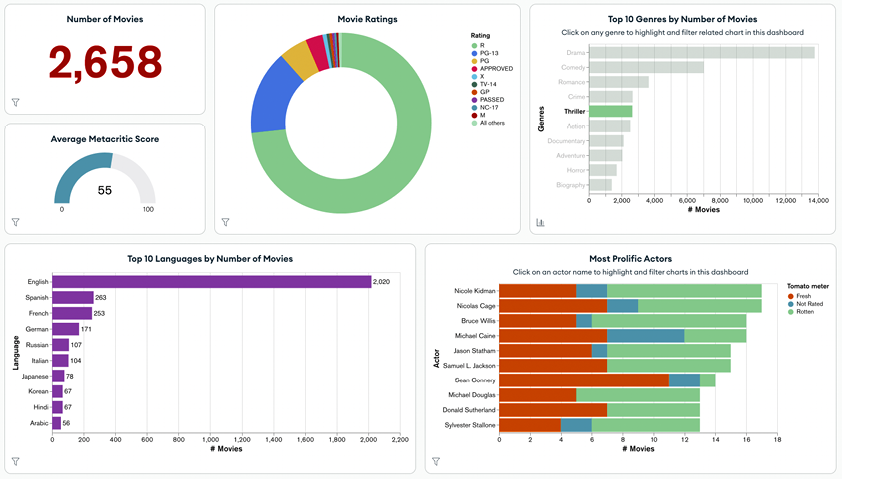
Use the dashboard figure to compare how multiple charts summarize movie counts, ratings, genres, languages, and actors. section 19.1
