An attack path connects exploitable conditions and resource relationships to show how a bad actor could breach an Azure environment and affect a business-critical resource. Defender for Cloud derives these paths from the cloud security graph, using internet exposure, network connections, lateral movement possibilities, permissions, and vulnerabilities. section 6.3 section 6.3.1
Investigate an attack path in the Azure portal:
- Open Microsoft Defender for Cloud, choose Recommendations, and select the Attack Path tile. section 6.3.1
- Select a path, open its Attack Path tab, and expand a row to inspect the graphical representation. section 6.3.1
- Select entities to review their insights and recommendations, then apply the suggested remediation steps. section 6.3.1
Internet-exposed virtual machine
A representative path shows an internet-exposed VM with high-severity vulnerabilities and read permission to a Key Vault. The combined conditions identify a risk that should be prioritized for remediation. section 6.3.1
Figure 6.6 An attack path shown for an internet-exposed VM that has high-severity vulnerabilities and read permission to a key vault
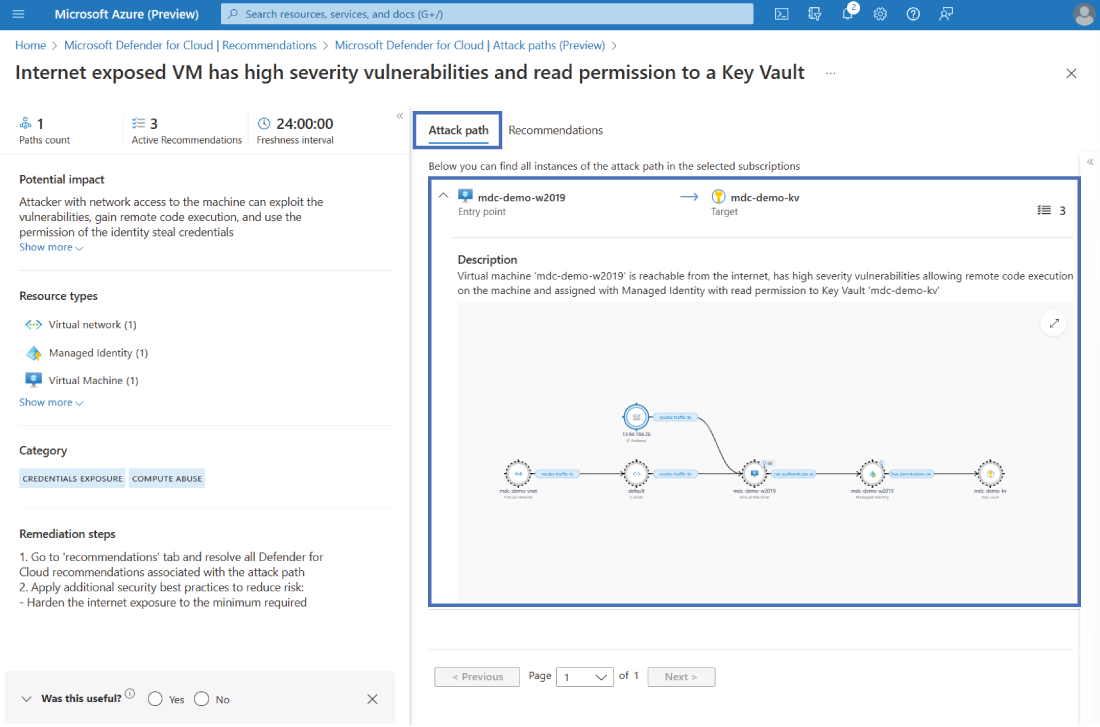
Use the attack-path graph to follow connected entities and inspect the security conditions leading from exposure toward a sensitive resource. section 6.3.1
