A cloud security graph models an environment’s resources, relationships, exposures, lateral-movement possibilities, and vulnerabilities. Defender for Cloud uses this contextual graph to identify risks according to both exploitability and business effect, helping teams prioritize remediation instead of treating every recommendation equally. section 6.3
Use the graph to connect technical weaknesses with their potential business impact:
- Assess exploitability, such as an internet-exposed VM containing high-severity vulnerabilities. section 6.3
- Assess business effect, such as that VM having access to a storage account containing sensitive customer data. section 6.3
- Prioritize attack paths that bad actors could use to breach the environment, then apply the associated recommendations. section 6.3.1
Investigating an attack path
In the Azure portal, open Microsoft Defender for Cloud, choose Recommendations, and select Attack Path. Choose a path such as an internet-exposed VM with high-severity vulnerabilities and read permission to a Key Vault. Expand the graphical path, inspect entity insights, and review recommendations for each contributing security problem. section 6.3.1
Enable the Defender CSPM plan before using advanced capabilities such as the cloud security graph. section 6.2.4
Figure 6.6 An attack path shown for an internet-exposed VM that has high-severity vulnerabilities and read permission to a key vault
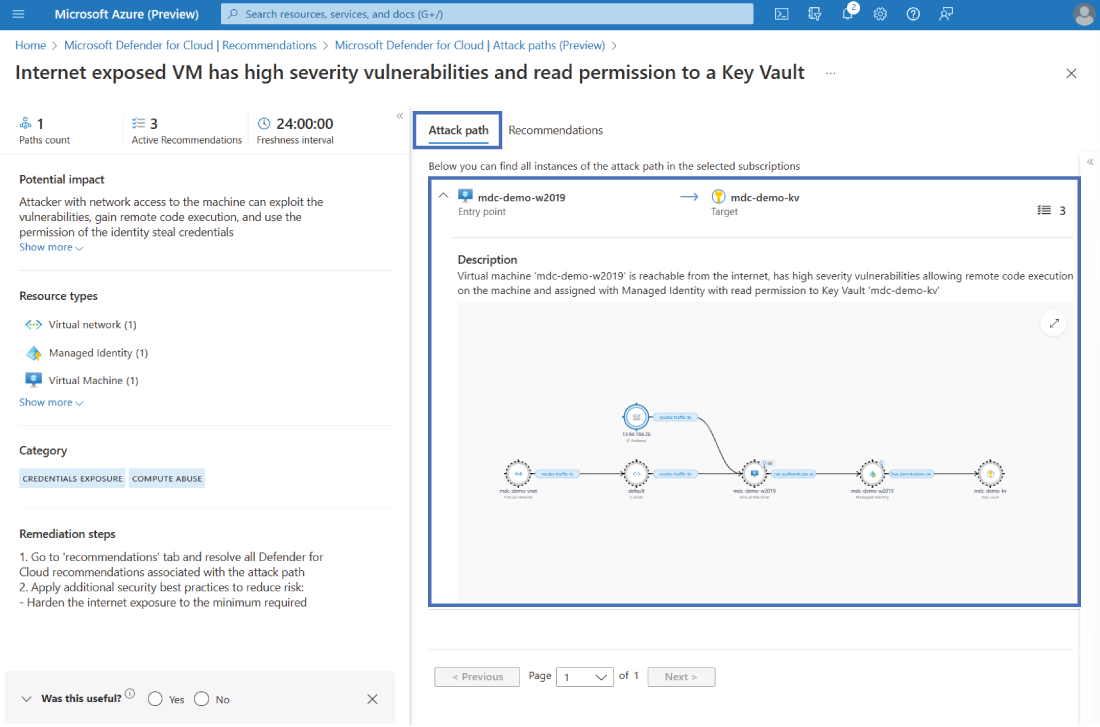
Use the attack-path visualization to inspect connected entities and understand how an exposure, vulnerability, and permission combine into a risk. section 6.3.1
