Cloud security explorer is a Microsoft Defender for Cloud capability for querying cloud security data and contextual relationships. Graph-based queries reveal exploitable resources and their potential business effects, helping prioritize risks such as vulnerable, internet-exposed virtual machines with access to sensitive storage. section 6.3.2 section 6.9
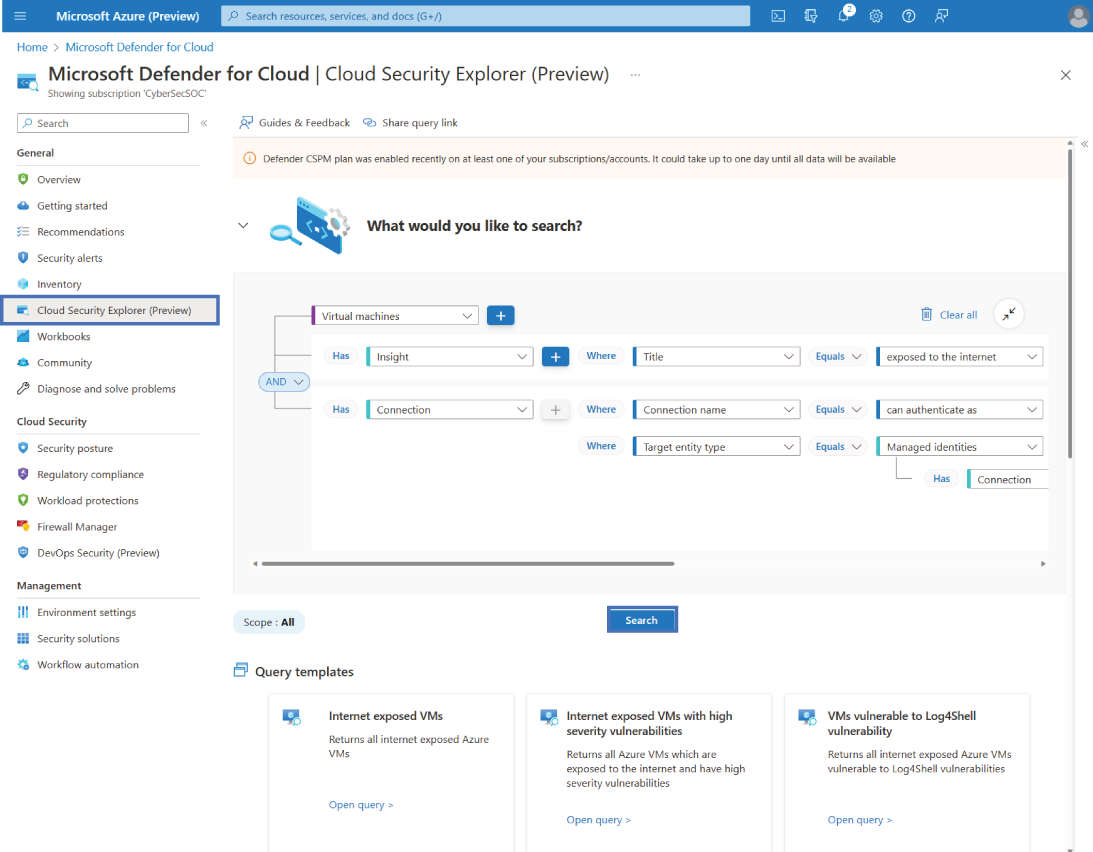
Use the explorer view to inspect relationships among resources, vulnerabilities, insights, recommendations, and connections. section 6.3.2
Build queries from the security information available in the environment:
- Recommendations identify supported security recommendations. section 6.3.2
- Vulnerabilities expose findings from Microsoft Defender for Cloud. section 6.3.2
- Insights provide contextual information about resources. section 6.3.2
- Connections show relationships between resources, such as access to storage accounts or key vaults. section 6.3.2 section 6.3.1
Find internet-exposed vulnerable virtual machines
Open Microsoft Defender for Cloud in the Azure portal and select Cloud Security Explorer. Choose Virtual Machines, add a Vulnerabilities filter with Severity equal to High, then add an Insight filter whose Title is Exposed to the Internet. Select Search and inspect individual results for additional resource insights. section 6.3.2
Practice identity and repository investigations
Query Identity & Access user accounts that do not have MFA enabled and have permissions to Azure Storage Accounts. Separately, query DevOps code repositories that allow public access. These investigations extend the explorer from infrastructure risks to identity and code-to-cloud exposure. section 6.8 section 11.8 section 11.4.9
