A graph query evaluates resources, security findings, contextual insights, and relationships to reveal exploitable conditions and their business effect. In Microsoft Defender for Cloud, Cloud Security Explorer applies these queries to cloud security data, helping prioritize risks such as vulnerable virtual machines that can reach sensitive storage. section 6.3.2 section 6.9
Build a query for internet-exposed virtual machines with high-severity vulnerabilities:
- Open Microsoft Defender for Cloud in the Azure portal and select Cloud Security Explorer. section 6.3.2
- Select Virtual Machines, add a Vulnerabilities filter, and set Severity to Equals > High. section 6.3.2
- Add an Insight filter, select Title, and choose Exposed to the Internet. section 6.3.2
- Select Search, then inspect the returned resources and open individual results for additional insights. section 6.3.2
The same approach can investigate relationships between repositories, compute resources, data stores, recommendations, vulnerabilities, and contextual insights. Onboarded repositories from Defender for DevOps can therefore be examined through Cloud Security Explorer to assess whether they are accessible from the internet. section 11.4.9 section 6.3.2
Repository exposure check
Write a Cloud Security Explorer query that determines whether any repositories in the environment are accessible to the internet. section 11.4.9
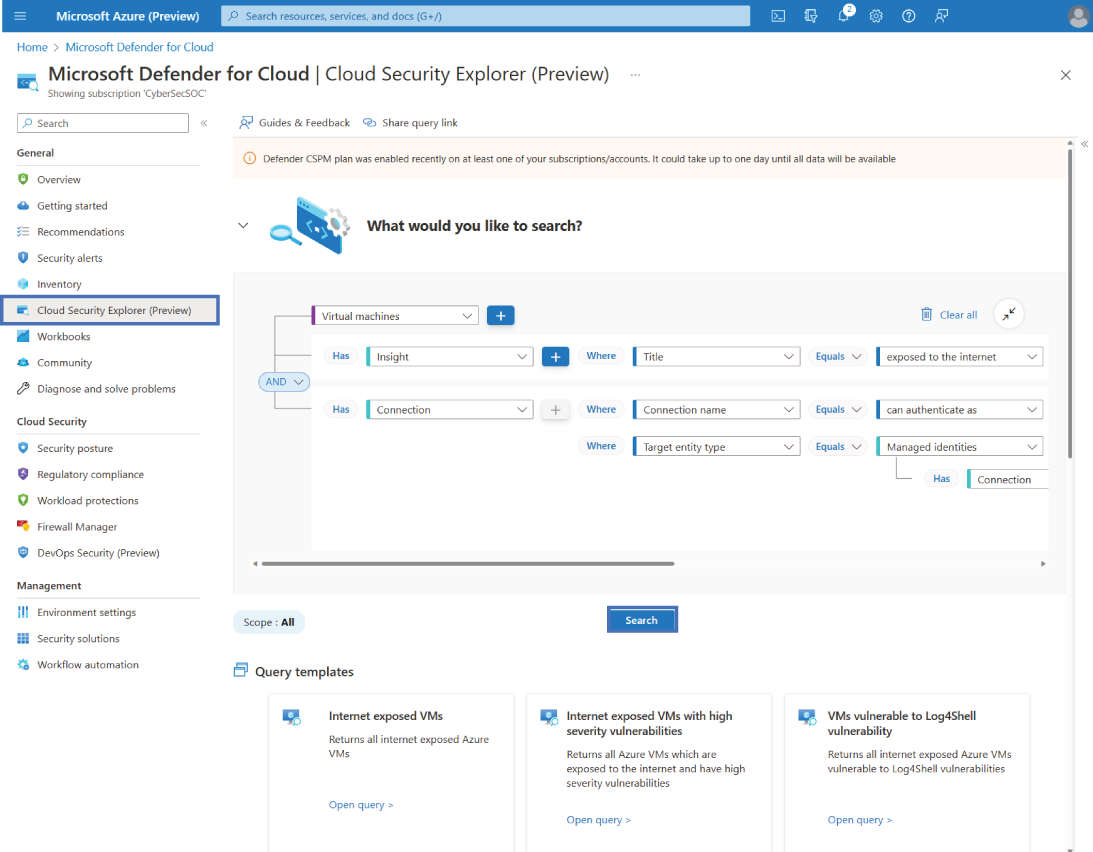
Use the Cloud Security Explorer view to connect query filters with the surrounding security context. section 6.3.2
