An attack surface is the set of components and exposed capabilities that could be targeted to compromise a system. In SQL Server installation, unnecessary operating-system components, services, and features enlarge that surface. section 8.4 section 8.7
Two installation mistakes make the attack surface larger than necessary:
- Mistake #36: installing Desktop Experience because developers use Visual Studio. Server Core removes the GUI, reduces running components and services, and is suitable for SQL Server; Visual Studio should run on developer workstations or, when necessary, development servers. section 8.4
- Mistake #39: installing every SQL Server feature. Extra services consume resources, require patching, and may provide a path to lateral access if exploited. Install only required features—the YAGNI principle applies to server configuration. section 8.7
A safer SQL Server deployment
A team builds a SQL Server 2022 instance on Windows Server 2022 and selects Desktop Experience because SSIS developers use Visual Studio. A safer design keeps Visual Studio on developer workstations, administers a production server with Server Core, and installs only the SQL Server features the workload requires. section 8.4 section 8.7
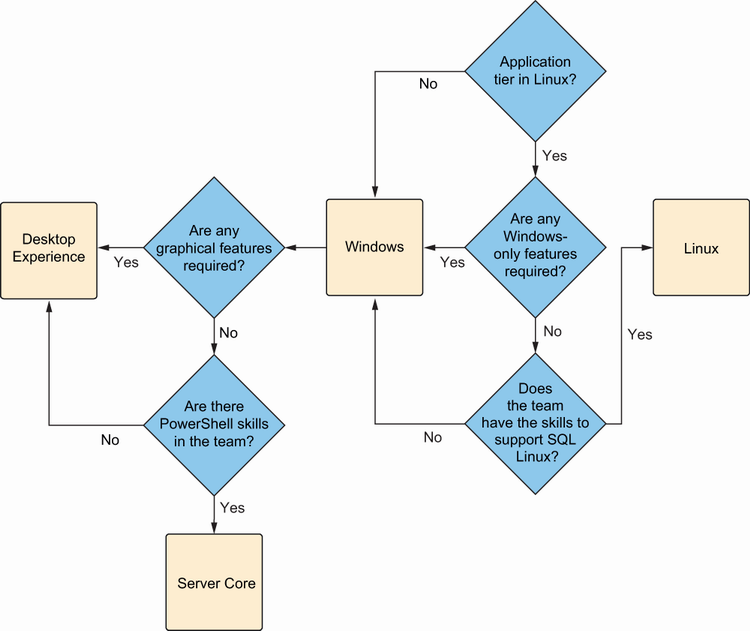
Use the decision tree to compare Server Core with Desktop Experience when choosing the operating-system installation. section 8.4



