AutoGen Studio is a graphical development environment for designing, testing, and managing multi-agent applications with AutoGen. Agents communicate through natural-language conversations to solve tasks directed by a user. section 4.1 section 4.7
A typical AutoGen Studio workflow includes:
- Create a Python virtual environment, install the requirements, define an OpenAI API key, and launch the interface with `autogenstudio ui --port 8081`. section 4.1.1
- Enter a complex task in the chat interface, such as creating a plot about Google searches for “GPT Agents.” section 4.1.1
- Let an assistant generate code while a UserProxy executes it, evaluates the output, and gives feedback until the task is approved. section 4.1 section 4.1.1
The Build tab supports configuring models, agents, workflows, and skills. Skills extend agents with actions such as code execution, API calls, image generation, web retrieval, or output inspection. A custom image-description skill can inspect a generated cover and help verify its title. section 4.1.2
Validate a generated book cover
Add a `describe_image` skill, attach it to the primary assistant, and request: “Please create a cover for the book GPT Agents In Action; use the describe_image skill to make sure the title is spelled correctly.” The agents generate the image and inspect it for quality. section 4.1.2
Figure 4.1 How AutoGen agents communicate through conversations (Source: AutoGen)
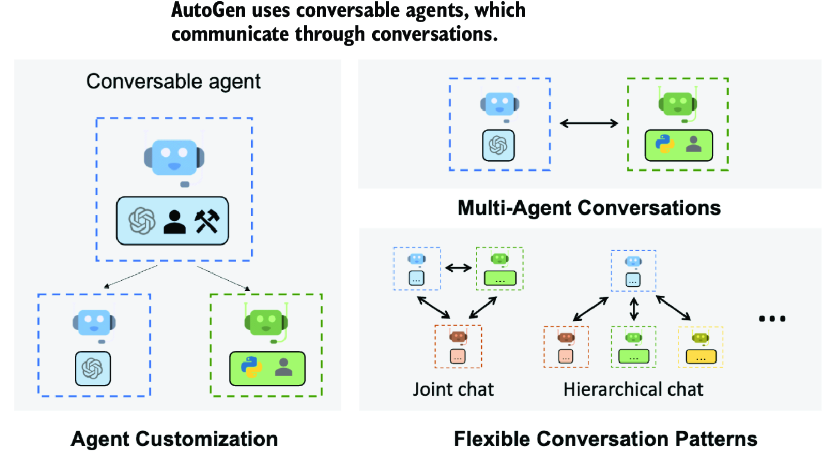
Use the communication diagram to compare proxy, group, and hierarchical agent conversations. section 4.1
