An availability zone (AZ) is an isolated location within an AWS Region containing at least one data center. A Region contains multiple AZs, connected by low-latency links. An AZ name such as us-east-1a identifies a zone within a Region, but the letter can map to a different physical zone in another AWS account. section 13.2.1 section 13.2.5
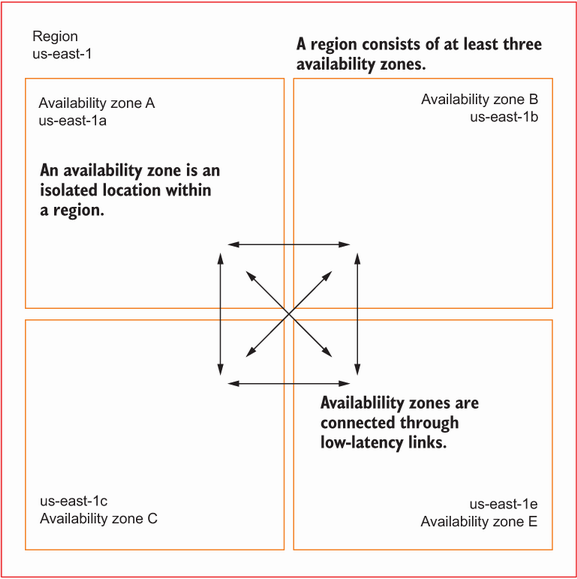
The diagram places multiple isolated AZs inside one Region and shows the links between them. section 13.2.1
A single EC2 instance can fail, and recovery in its original AZ cannot solve an outage of that entire AZ. Distributing a workload across AZs lets it recover from that larger failure. The design must account for resources tied to one zone: a subnet belongs to one AZ, an EC2 instance launches in one subnet, and an EBS volume is unavailable during its AZ’s outage. section 13.2 section 13.2.4 section 16.0
Find zones and plan a web application's recovery
Run `aws ec2 describe-availability-zones --region $Region` to see the AZs available in a chosen Region. For a web application on EC2, use subnets in different AZs with an Auto Scaling group rather than relying on one instance. A replacement launched in another AZ uses another subnet, so it cannot retain the failed instance’s private IP address. If clients need a stable endpoint, options include associating an Elastic IP during instance bootstrap or using an Elastic Load Balancer. section 13.2.5 section 13.2.4 section 16.0
Check how each stateful component handles an AZ outage:
- An EBS volume remains tied to its AZ. EFS instead shares a filesystem across EC2 instances in different AZs and replicates its data across them. section 9.0 section 13.2
- RDS Multi-AZ places primary and standby databases in different AZs. Set `MultiAZ: true` on an `AWS::RDS::DBInstance` in CloudFormation to enable that deployment; expect additional charges and a short failover downtime. section 10.5.1 section 13.3.2
Cross-AZ traffic incurs charges, and latency within one AZ is lower than latency between AZs. Choose a deployment by checking each service’s resilience characteristics and availability commitments—not merely by counting AZs. section 13.2.1 section 13.3.2



