An Azure Automation account is the Azure resource that holds and executes automation. It provides a common home for PowerShell runbooks and shared automation assets, so related operational jobs can use the same Azure resources and configuration rather than carrying environment-specific values inside each script. section 8.2 section 8.6
Place the account in a Resource Group under an Azure subscription. Resource Groups organize related resources and provide a permission boundary through inherited permissions; resources such as Automation accounts and virtual machines are created in Resource Groups rather than directly in subscriptions. section 8.2
Design an account around the automation it will support:
- Choose a region compatible with linked services. A Log Analytics workspace and Automation account must use supported region pairings when they are linked for hybrid runbook workers. section 8.2.3
- Use a cloud-only account for cloud automations, or add Log Analytics with the Automation solution when jobs must run through a hybrid runbook worker in a local environment. section 8.2 section 8.6
- Give account variables descriptive names and encrypt them. Shared variables simplify reuse across runbooks, but changing one can affect every runbook that consumes it. section 8.4.1
- Treat account-level access as sensitive. A person permitted to create a runbook can access the account's assets, including credentials and managed identities. section 8.6
Archive upload automation
Create an Automation account alongside a Resource Group, Log Analytics workspace, and Storage account. Develop a PowerShell script locally to find ZIP files, upload them to Azure Blob storage, and remove the local files; then import the script as a runbook and replace hardcoded connection values with account assets. section 8.2.3 section 8.4 section 8.4.1
Local development is useful for fast testing and full editor support. After importing a script, adapt it to Azure Automation-specific asset access, including managed identity where needed. This hybrid workflow separates script logic from the account-managed values and identities used at execution time. section 8.4
Figure 8.1 Azure resources required for the storage upload automation. All resources are grouped into a single Resource Group, which resides under a subscription.
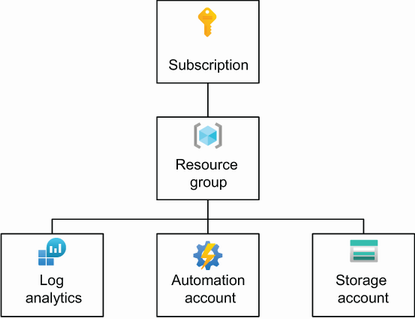
Use the resource layout to see how the Automation account, Log Analytics workspace, and Storage account are grouped under one Resource Group and subscription for the upload workflow. section 8.2
