An Azure Automation Hybrid Runbook Worker runs Azure Automation runbooks on a server outside Azure while keeping scripts, scheduling, and maintenance centralized in the automation account. It bridges cloud-managed automation with on-premises resources and servers in other clouds. section 8.0 section 8.2.1
A worker receives the selected runbook on its machine and executes it locally. Choose a hybrid worker when the job must reach local files, network resources, or other on-premises dependencies that Azure-hosted execution cannot access directly. section 8.2.1 section 8.4.2
Set up a Windows worker by linking the server to Azure services:
- Create an Automation account, Log Analytics workspace, and Automation solution; retrieve the workspace and Automation registration details. section 8.2.2 section 8.2.5
- Install and connect the Microsoft Monitoring Agent (MMA) to the Log Analytics workspace, then allow its initial sync to download worker files. section 8.2.2 section 8.3
- Use the downloaded hybrid worker module to register the server with the Automation account and assign a worker group. section 8.3
- Install required PowerShell modules on every worker for all users; modules imported into the Automation account are not transferred automatically. section 8.3.1
Worker groups provide load balancing and high availability, but do not let a runbook target one particular server within the group. Use a one-server group for machine-specific work, or PowerShell remoting when a specific server must be addressed. section 8.3
Archive upload from a local server
A runbook can find ZIP files in a local archive folder, authenticate to Azure with a managed identity, upload files to Azure Blob storage, and remove files only after the upload succeeds. Test it against the selected worker, verify the blob, then publish and schedule it. section 8.4 section 8.4.2
Runbook assets can include modules, variables, credentials, and certificates. Treat Automation-account permissions carefully: permission to create a runbook grants access to its stored assets, including credentials and managed identities. section 8.2.1 section 8.6
Figure 8.2 Automation account hybrid runbook worker automation flow, showing how runbooks can be executed either in the cloud or directly in your on-premises environment
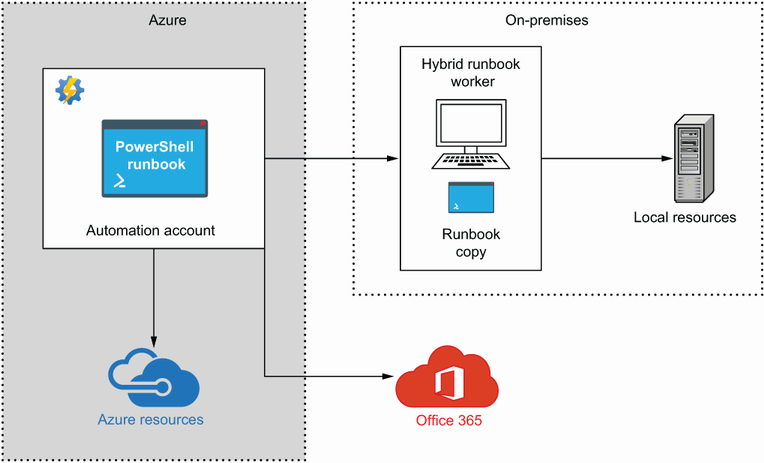
Compare cloud execution with delivery of a runbook to a hybrid worker in the on-premises environment. section 8.2.1
