Azure Automation runs recurring operational work as serverless runbooks stored in Azure. A runbook can execute in Azure itself or be delivered to a hybrid runbook worker on a selected server, so one centrally maintained automation can act on cloud, on-premises, and other-cloud resources. This makes it useful when scheduling and governance need to be centralized but the files, services, or infrastructure being managed are not. section 8.0 section 8.2.1
Runbooks may be written in PowerShell 5.1, PowerShell Workflow, Python 2, or Python 3, or assembled as graphical runbooks. A PowerShell runbook can be developed locally in VS Code or ISE, tested where feedback is quicker, then imported into an Automation account. Portal editing remains useful after import when the script must retrieve Automation assets such as credentials or variables. section 8.2.1 section 8.4
Figure 8.2 Automation account hybrid runbook worker automation flow, showing how runbooks can be executed either in the cloud or directly in your on-premises environment
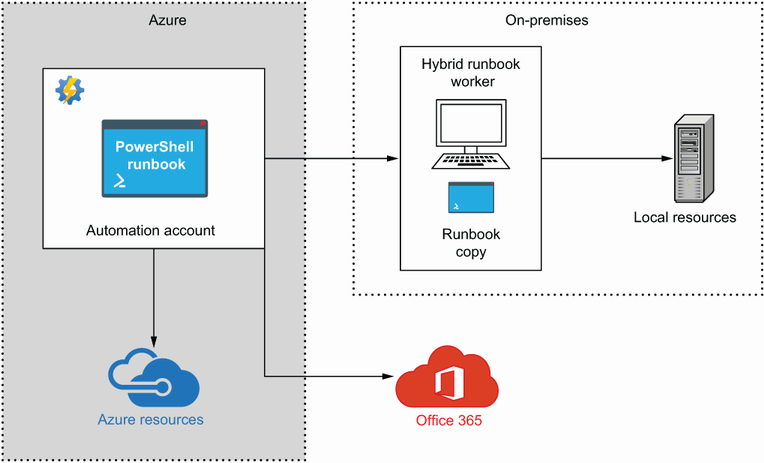
The execution flow distinguishes cloud-hosted runbook execution from delivery to a hybrid runbook worker, which provides access to local resources while keeping the runbook in Azure. section 8.2.1
A practical hybrid automation separates the work into clear stages:
- Prepare an Automation account and a Windows Server 2012 R2-or-later worker with outbound TCP 443 access; hybrid workers require Log Analytics with the Automation solution. section 8.1 section 8.6
- Build and test the PowerShell logic locally before importing the .ps1 file as a named runbook. section 8.4 section 8.6
- Store reusable modules, variables, credentials, and certificates as Automation assets rather than scattering their values through scripts. section 8.2.1
- Control Automation-account permissions carefully: permission to create a runbook also exposes the account's assets, including credentials and managed identities. section 8.6
Upload local ZIP archives to Azure Blob storage
A hybrid runbook can check an on-premises folder for ZIP files, connect to Azure, select the subscription, obtain a storage-account key, create a storage context, upload each archive to a Blob container, and remove the local copy afterward. Develop this flow locally with interactive Connect-AzAccount authentication; after importing it, adapt authentication to use a managed identity and required Automation assets. Test archives can be created before testing the upload path. section 8.0 section 8.4
