Azure Monitor agent (AMA) collects guest operating system data from Azure virtual machines running Windows or Linux. It supports security monitoring by routing selected events and performance data to Azure monitoring destinations, where they can support investigation of suspicious activity and signs of compromise. section 9.1.4 section 9.10
AMA is the successor direction for the Log Analytics agent. A key reason to use it is multihoming: data collection rules can send performance data and security events to different Log Analytics workspaces, helping avoid placing lower-security-value performance data in a workspace that incurs Microsoft Sentinel ingestion charges. section 9.1.4
Deploy AMA with its operational dependencies in mind:
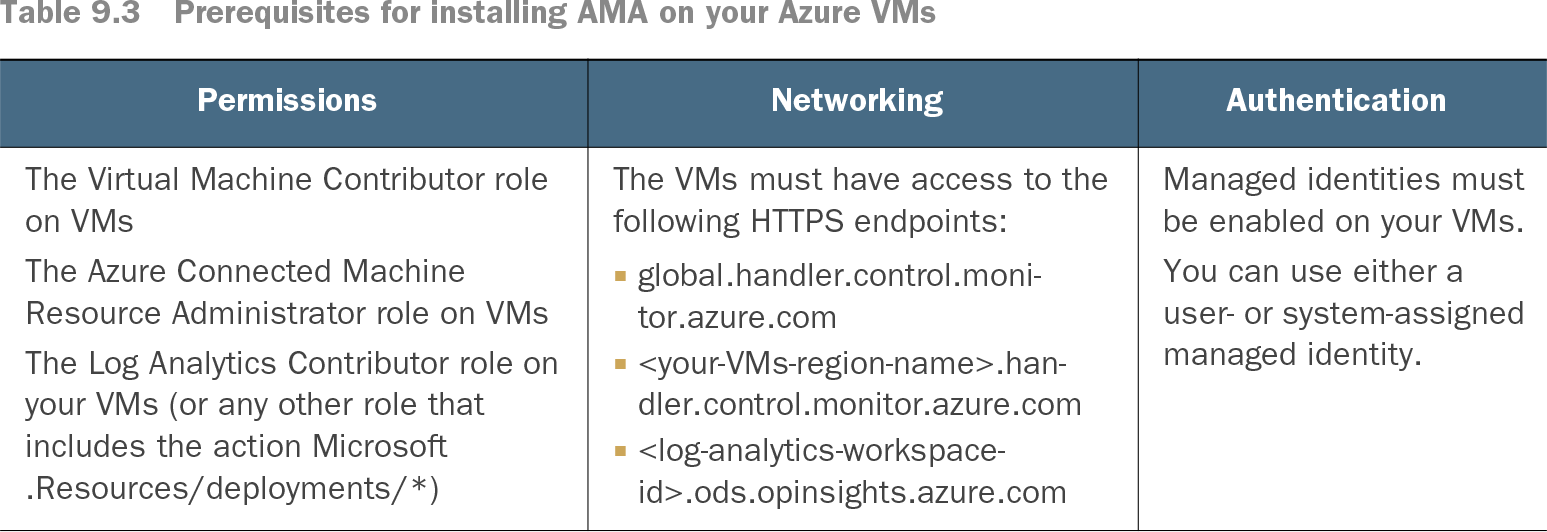
- Grant deployment permissions, including Virtual Machine Contributor, Azure Connected Machine Resource Administrator, and Log Analytics Contributor or a role with Microsoft.Resources/deployments/*. section 9.1.4
- Provide HTTPS access to the handler control endpoints and the target Log Analytics workspace ingestion endpoint. section 9.1.4
- Enable a managed identity. Either system-assigned or user-assigned identities work; favor user-assigned identities for large-scale deployments. section 9.1.4 section 9.4.1
- Install the AzureMonitorWindowsAgent VM extension with Azure CLI when configuring Windows VMs directly, optionally enabling automatic extension upgrades. section 9.1.4
Collect Linux authentication data
Create a data collection rule in Azure Monitor, choose Linux, add the target VMs, and define the required data sources and destinations. Selecting Azure VMs during this flow automatically installs AMA. When using a data collection endpoint, place it in the same region as the connected agents; use one endpoint per agent region. section 9.4.1
Table 9.3 Prerequisites for installing AMA on your Azure VMs (view table figure)
Review the required roles, network endpoints, and managed-identity configuration before installing AMA on Azure VMs. section 9.1.4
AMA integration availability can vary by Azure service. Although AMA is generally available, its Microsoft Defender for Cloud integration is identified as public preview, while the Log Analytics agent integration is generally available; assess that distinction before choosing an agent for production Defender for Cloud workflows. section 9.1.4 section 6.2.1