Azure Policy is a governance service for controlling resource configurations and assessing compliance with organizational business rules. It supplies guardrails before misconfigurations become part of the environment: assigned policies evaluate existing resources and future deployments, can report noncompliance at scale, prevent disallowed deployments, or automatically apply required configuration. This supports a security baseline as resources and subscriptions continue to change. section 10.0 section 10.1
A policy definition expresses one business rule in JSON and controls a particular resource configuration. Start with built-in definitions in the Azure portal rather than recreating common controls. Available rules include restricting virtual machine SKUs or deployment regions, requiring or automatically applying tags, enabling VM monitoring agents, and preventing public VM endpoints. A definition can be modified and saved under a new name when a built-in rule needs adaptation. section 10.2 section 10.2.1
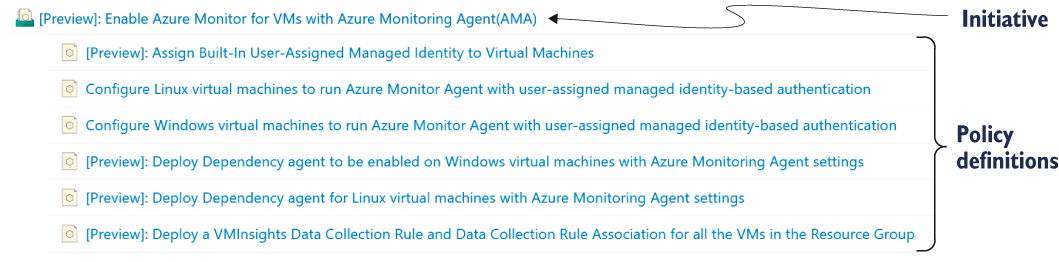
Compare the single-rule policy definition with a policy initiative, which groups definitions behind one overarching objective. section 10.2.1
Assign a definition or initiative at a management group, subscription, resource group, or individual resource scope. Apply it at the highest scope that fits the organization to reduce overlapping assignments. Assignment triggers a scan of existing resources and a compliance report; later create and update requests are evaluated as well. Where policies overlap, the most restrictive policy takes precedence. section 10.2.2 section 10.4
Choose an effect according to the maturity of the control:
- Audit permits creation while marking resources compliant or noncompliant. Use it first to understand what a prospective restriction would affect. section 10.2.3
- Deny blocks a create or update request when the resource fails the policy. Move to Deny only after Audit results are understood, and provide noncompliance messages so users know why deployment was blocked. section 10.2.3
- Modify supports auto-remediation by adding a missing configuration during deployment, such as tags inherited from the relevant resource group. section 10.2.3
Restrict virtual machine sizes in a subscription
To manage cost, locate the built-in Allowed virtual machine size SKUs definition, then create an assignment at the subscription scope. Supply the policy definition ID and a JSON parameter listing permitted SKUs, such as Standard_D2s_v3 and Standard_D4s_v3. The assignment output records its name, scope, definition ID, parameters, and enforcement mode. If a necessary resource group requires an exception, create a policy exemption linked to that assignment; a Waiver accepts its noncompliance. section 10.2.1 section 10.2.2
Use initiatives to manage related controls together—for example, policies that ensure Azure Monitor Agent coverage on Windows and Linux VMs and supporting managed identity configuration. For security-focused custom initiatives, surface evaluation results in Microsoft Defender for Cloud’s Regulatory Compliance dashboard and Recommendations blade, avoiding a separate policy-only view. section 10.2.1 section 10.4
Figure 10.6 Adding a custom policy initiative on the Regulatory Compliance dashboard in Defender for Cloud
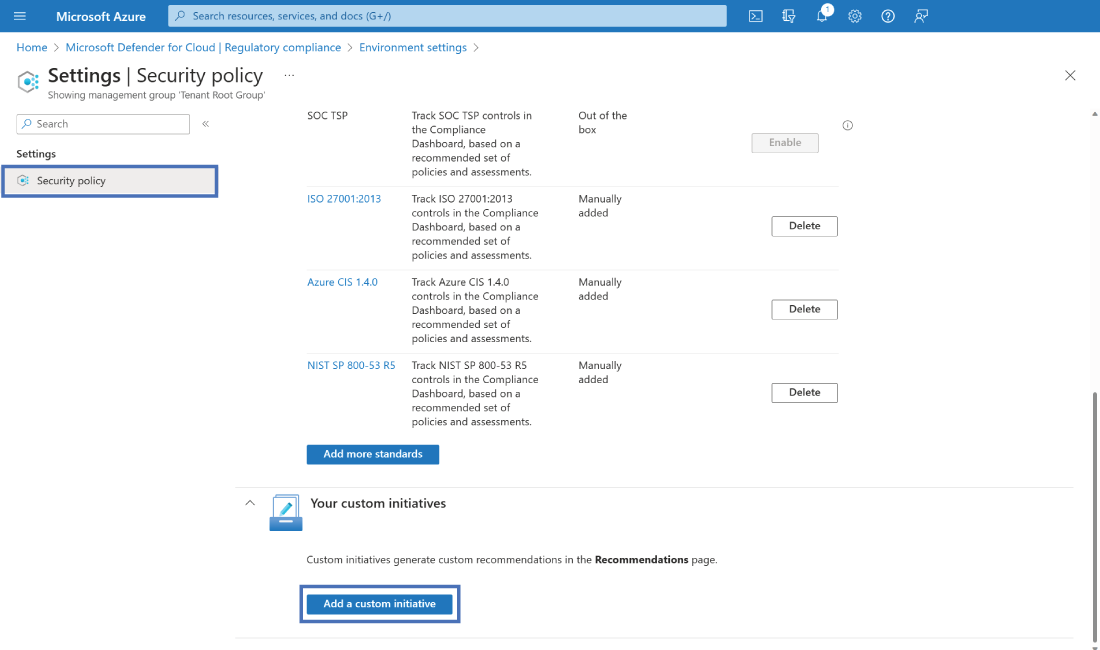
Follow the portal flow for adding a custom initiative to the Microsoft Defender for Cloud Regulatory Compliance dashboard. section 10.4

