Backward compatibility preserves the behavior, functionality, and access paths that existing users or integrations expect after a software change. During modernization, a visually similar replacement can still fail if customers’ remembered URLs stop working or if an AI tool removes an existing UI element while trying to simplify the application. section 2.7.1 section 2.2.4
Apply compatibility as an explicit migration contract:
- Preserve existing functionality even when the replacement UI does not match the previous styling pixel for pixel. section 2.2.4
- Keep established entry points available alongside new ones, because users and integrations may continue calling remembered URLs. section 2.7.1
- State the requirement in prompts, assumptions, tests, and deployment checks rather than relying on generated code to infer it. section 2.7.1 section 2.2.4
- Reject shortcuts that preserve source-code structure but create technical debt or make validation and diagnosis harder. section 7.3.1
A migration that keeps the old URL working
After migrating the application to Spring Boot, the old address http://localhost:8080/kitchensink/index.jsf remains reachable, while the new root address http://localhost:8080/kitchensink/ is also available. The UI remains almost identical, including the registered-members list that an earlier automated change removed. section 2.7.1
Figure 2.6 UI after migration to Spring Boot.
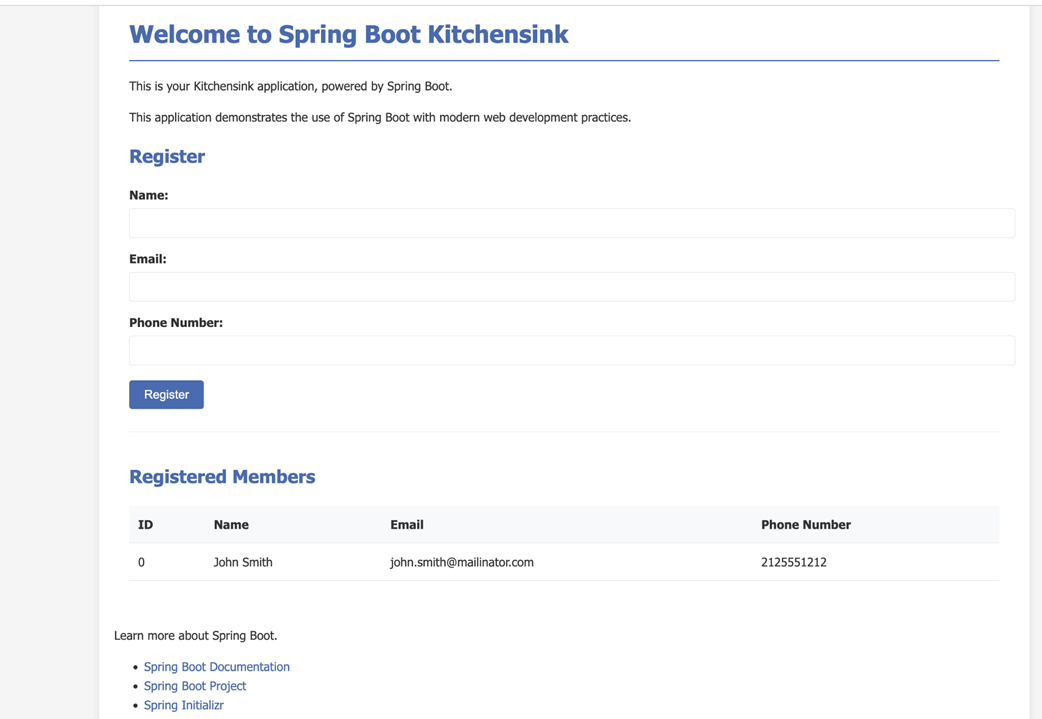
Use the migration figure to compare the resulting UI with the legacy application and assess whether the visible behavior remains acceptable. section 2.7.1