A bad page split happens when SQL Server must make room in a full page located in the middle of an index. It allocates a new page outside the existing physical order, moves roughly half the rows to it, and updates page links. The result is both out-of-order pages and less-dense pages. section 9.2 section 11.12
Figure 9.2 Bad page split
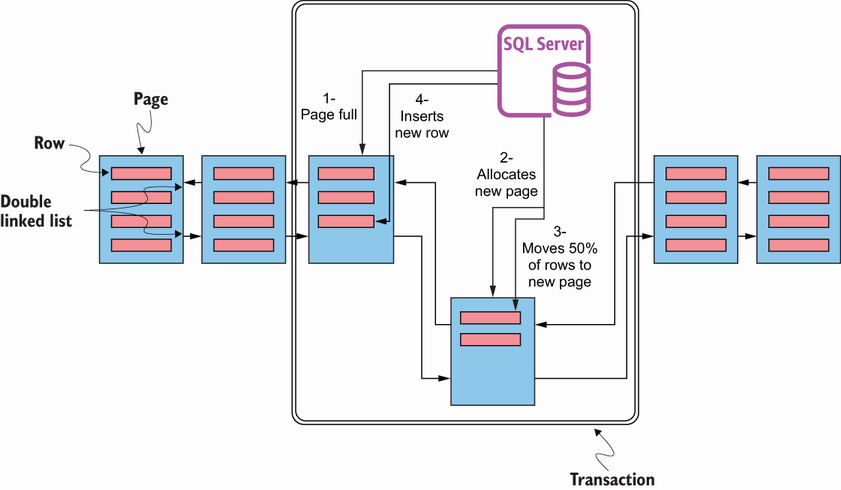
The diagram shows why splitting a middle page differs from extending the end of an index: the newly allocated page sits out of physical order. section 9.2
A bad split has two practical costs:
- It creates external fragmentation: logically adjacent index pages are physically out of order. This can hurt index scans, though index seeks are not affected by external fragmentation. section 11.12
- It creates internal fragmentation: moving rows leaves lower page density, so SQL Server may need to read more pages for the same data. section 9.2 section 11.12
- It adds I/O during the split itself, because SQL Server must allocate a page, move data, and maintain page pointers. section 11.1
Expansive update in a middle page
An insert is not the only trigger. Updating a VARCHAR value from 5 characters to 60 can enlarge the row enough to require a split. This can occur on nonclustered indexes and also on clustered indexes, particularly with nonsequential clustered keys. section 11.1
Do not treat every page split as a failure. A split at the last page of a full index simply allocates the next page at the end, without moving existing rows; that is a normal, good page split. The concern is avoiding unnecessary splits in the middle while balancing free space against wasted reads. section 11.1 section 11.12
Check fragmentation at the leaf level with sys.dm_db_index_physical_stats before acting. When rebuilding is warranted, rebuild the affected indexes rather than indiscriminately rebuilding everything; FILLFACTOR can leave space for future growth, but the appropriate level depends on the workload. section 9.2 section 11.1 section 11.12
