Visual balance distributes text, media, navigation, and white space so a page feels stable, appealing, and intentional. It is not the same as symmetry: equal-looking halves can feel static, while an asymmetric layout can still feel balanced. section 6.7 section 6.7.3
Balance comes from the combined visual weight of a page’s parts. Empty space, detail, size, contrast, color, headline scale, and eye-leading lines all affect that weight. A large quiet area can counterbalance a smaller but busy content area. section 6.7.1 section 6.7.2
Build a balanced layout by working from attention to refinement:
- Choose a focal point—the area viewers notice first. On a home page, this is often a hero image that represents the site. section 6.7.1
- Arrange content around that starting point by adjusting block position, size, and alignment, creating the viewing path you want visitors to follow. section 6.7.1
- Compare areas by their total weight, not just darkness or amount of content. Larger shapes and more complex areas can both carry more weight. section 6.7.2
- Use a well-designed template as a starting point when helpful, but recognize that reusing it unchanged can make pages look too similar. section 6.7.1
- Review the overall composition rather than defaulting to strict symmetry; ask for design feedback when a layout still feels uncertain. section 6.7.3
Check a layout in four zones
Mentally divide a page into four quadrants and compare their visual weight. Consider shape size and line or content complexity together. If removing detail makes opposite areas match too exactly, the page may have become symmetrical rather than more pleasingly balanced. Squinting can help reveal the large relationships between areas. section 6.7.2
Figure 6.3 When an image is separated into a quadrant, you can more easily check the balance.
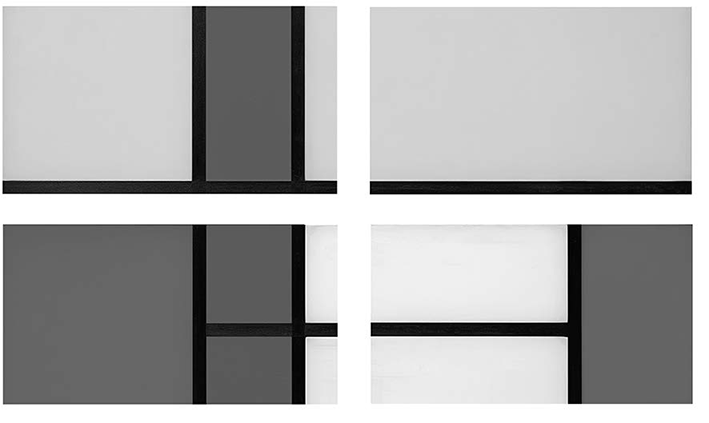
Use the quadrant overlay to inspect whether each region contributes comparable visual weight without requiring identical shapes or detail. section 6.7.2
Crop toward balance, then verify
When cropping an image, move an important subject slightly off-center rather than removing it. Treat AI suggestions as proposals to check: repeated feedback and a clearer request may be needed before the crop matches the intended composition. section 6.7.3

