A branch is a separate snapshot, or copy, of a repository that lets work continue independently from the main line. Use one when a data science project needs to test an idea without changing the code treated as the source of truth. section 2.5 section 2.3.1
Branches keep experiments separate from production-ready code. A small project with few contributors may use only main, while a larger team can use branches to prevent rapidly changing prototype code from cluttering main. section 2.3.1 section 2.5
A practical Git branch workflow is:
- List local branches with `git branch`; the asterisk marks the active branch. Add `-a` to include remote branches. section 2.5.1
- Create an experimental line with `git branch rules_based_model`, then switch to it with `git checkout rules_based_model`. section 2.5.1
- Commit work on the active branch; those commits affect that branch rather than main. section 2.5.1
- Publish a newly created branch with `git push --set-upstream origin rules_based_model`. section 2.5.1
- When the work is ready, switch to main and merge it with `git merge rules_based_model`. section 2.5.1
Compare churn-model approaches safely
One collaborator can develop a rules-based churn model on one branch while another tests a random forest on another. If the random forest is chosen, merge that branch into main; the unselected experiment need not change the main codebase. section 2.4.3 section 2.5.1
Figure 2.7 Branching can be thought of as having different snapshots of the same codebase. Each branch might have its own alternate set of changes. However, each branch can ultimately be merged back together, or back into the single main branch.
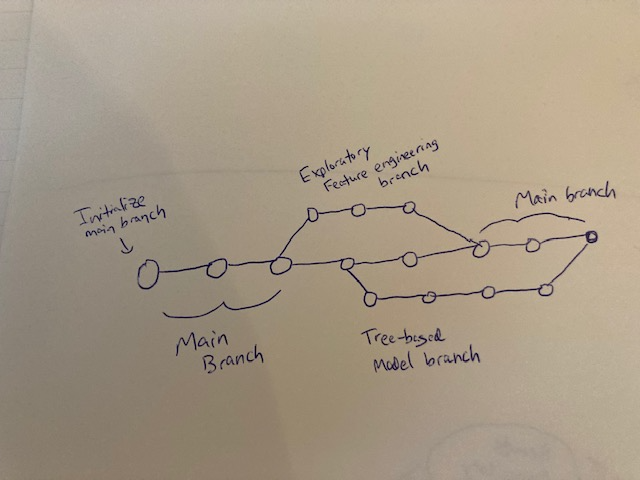
The diagram visualizes branches as alternate snapshots that can later merge back into a single main branch. section 2.5
Agree on a branch policy with contributors early. Clear expectations about which work belongs on main versus experimental or development branches make collaboration and code tracking easier. section 2.7 section 2.6