A bug bash is a time-boxed, collaborative exploratory testing event held around a milestone such as a release. People across roles explore a product from their own perspectives, report bugs and improvement ideas, and build confidence in quality together. It complements rather than replaces dedicated testing, because real workflows and unexpected use cases can escape automation or role-based checks. section 1.1 section 1.5
The value comes from diversity as much as volume. Engineers, salespeople, support staff, leaders, and others notice different problems; personal background, language, and experience can reveal assumptions a familiar team misses. Findings may range from urgent defects to suggestions about user experience, security, or workflows. section 1.2.1 section 1.3
Run a bug bash as a focused shared activity:
- Set a mission and scope tied to a release, accessibility initiative, product rework, or another organizational milestone. section 1.4.1
- Gain leadership support, recruit allies, and choose participants appropriate to the scope and organization. section 1.4.2 section 2.3
- Prepare a timeline, location or communication space, scenarios or guidance, reporting channel, and bug-tracking approach. section 1.4.3 section 3.1.3
- Facilitate the time-bound event with clear instructions, then review, prioritize, fix, and share results. section 1.3.2 section 1.4.3
A small-team bug bash
A 10-person team building a dating app reserves two hours to test alone or in pairs. Participants choose scenarios such as matching, chat behavior, many simultaneous matches, reporting users, or using another language, then log findings through an agreed channel. The session broadens coverage, creates useful test data, and helps the team judge release readiness. section 2.3.1
Treat the event as purposeful play, not unstructured chaos. A clear mission, time boundary, setting, facilitator, varied players, instructions, and preparation help people focus while keeping the experience collaborative and engaging. Plan for the work around the event too: preparation and result review require time and shared organizational effort. section 1.3.2 section 1.4
Figure 1.3 The anatomy of a bug bash. On the left, you see what comes into the bug bash; in the middle, the event itself and its aspects; and on the right, the event's outcomes. All this leads to a better quality product.
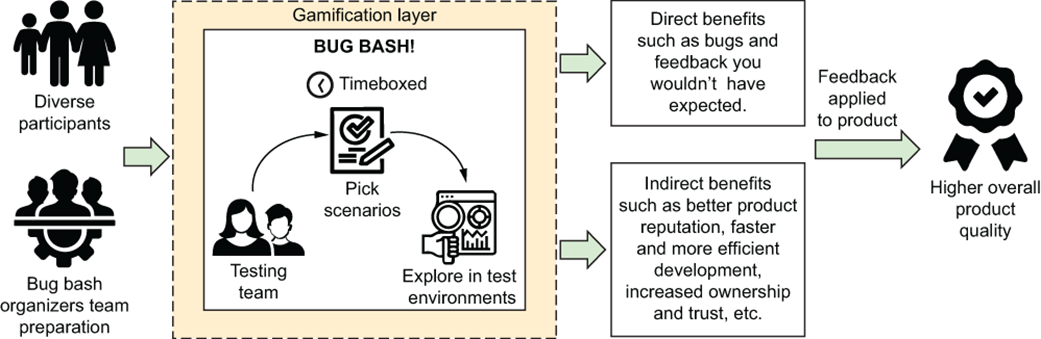
Use the event anatomy to see bug bashing as a flow: prepare inputs, run the collaborative session, review outcomes, and improve product quality. section 1.3.1