A notebook cell is a discrete workspace for code, Markdown text, or another supported output such as a chart. Run cells independently, inspect the result, and build the next step without rerunning the whole notebook. section 3.3.1
Use cells to keep experiments understandable and adjustable:
- Define and test a function in one cell, then use it for another task in a later cell. section 3.3.1
- Separate slow model execution from fast configuration changes, so tweaking prompts or dimensions does not repeatedly rerun the model. section 3.4.5
- Store reusable prompt and image settings in a configuration cell, then run another cell that loops over panels, creates folders, generates images, and saves them. section 3.5
A small image-generation workflow
One cell can configure a pipeline call with a prompt, dimensions, guidance scale, and random generator. Another cell can request multiple images and select one result with .images[0] or .images[1]. A later cell can automate the same process across several panel configurations. section 3.4.5 section 3.5
Figure 3.1 Basic layout of a Jupyter notebook.
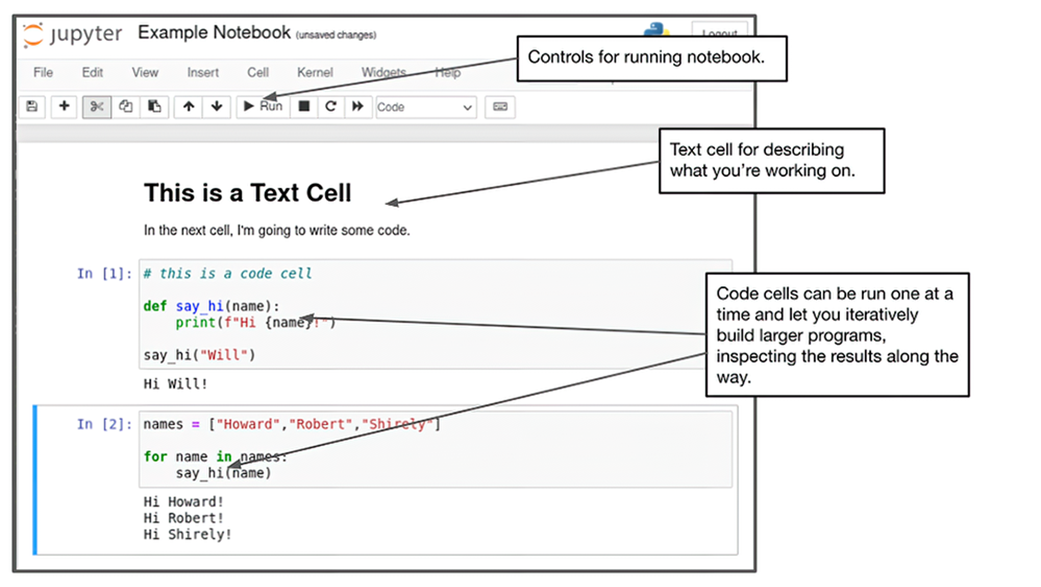
Use the notebook layout to see how cells divide a project into separate, testable, changeable pieces. section 3.3.1

