Jupyter Notebook turns programming into a row of small experiments: write a little code, run it, inspect the result, and adjust. That rhythm makes complex Stable Diffusion work easier to understand, test, and modify. section 3.3 section 3.3.1
A practical notebook workflow looks like this:
- Start Jupyter locally with `jupyter notebook`; it launches a server and opens the notebook interface in your default web browser. section 3.3.1
- Put code in one cell and explanatory text in another, usually using Markdown. section 3.3.1
- Run cells independently, inspect their outputs, and build the next step from code that already works. section 3.3
- Keep functions, experiments, and explanations together so individual parts can be changed without rewriting the whole program. section 3.1 section 3.3.1
Test before you build
Define a function in one cell, run it to confirm that it works, then call it for another task in a separate cell. For a Stable Diffusion project, the same pattern lets you isolate and debug pieces of a larger workflow. section 3.3.1
Figure 3.1 Basic layout of a Jupyter notebook.
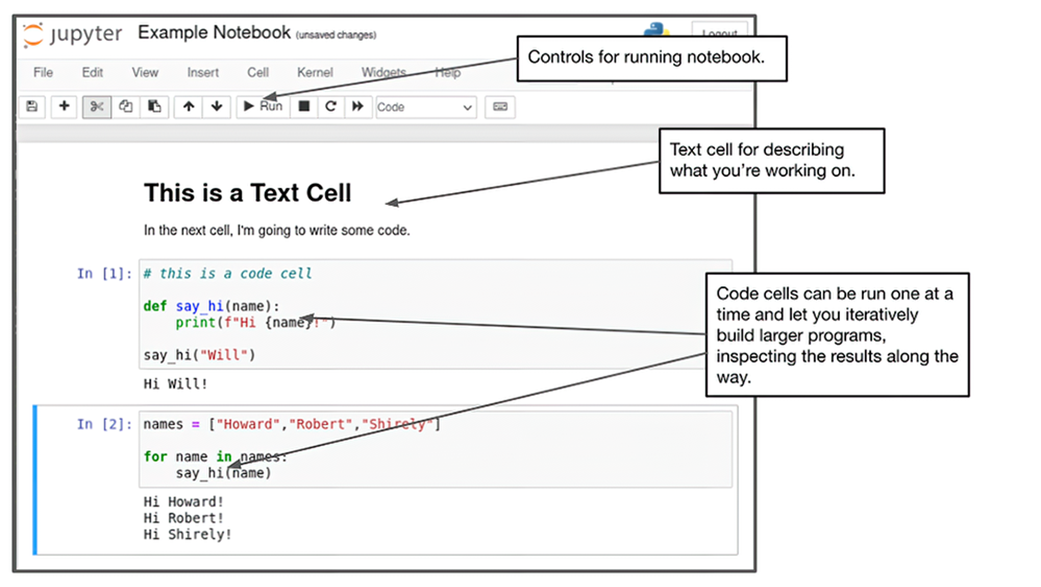
Use the interface layout to identify cells and see how separate cells support incremental testing and reuse. section 3.3.1
