Cisco Discovery Protocol (CDP) is a Cisco-proprietary Layer 2 protocol that helps directly connected Cisco devices identify one another and share hostnames, capabilities, interfaces, hardware models, IP addresses, and related information. Devices periodically send advertisements and listen for advertisements from neighbors, making CDP useful when network documentation is incomplete. section 1.0 section 1.1
Figure 1.1 Two neighboring Cisco devices share information about themselves via CDP. The shared information includes hostname, capabilities (device type), port ID, IP address, and much more.
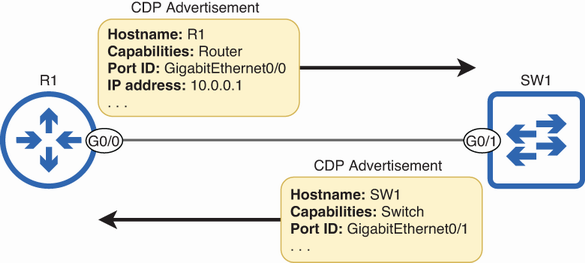
Neighbor advertisements expose hostname, device capabilities, port ID, IP address, and other identity information. section 1.1
Use these commands to inspect and control CDP:
- Run show cdp neighbors to view each neighbor’s hostname, local interface, holdtime, capabilities, platform, and neighboring port. Local Intrfce identifies the interface on the device being inspected; Port ID identifies the neighbor’s interface. section 1.1.1
- Run show cdp neighbors detail for expanded neighbor information, or show cdp entry name for one specified neighbor. section 1.1.3 section 1.3
- Run show cdp to verify global status, advertisement timing, holdtime, and CDP version; defaults are 60 seconds, 180 seconds, and CDPv2. section 1.1.3
- Configure cdp timer seconds, cdp holdtime seconds, and no cdp advertise-v2 to change advertisements, retention time, or version. section 1.1.3
- Disable CDP globally with no cdp run or on one interface with no cdp enable; restore it with cdp run or cdp enable. section 1.1.3
- Use show cdp interface [interface] to verify interface status and show cdp traffic to inspect sent and received message counters. section 1.1.3
Mapping an undocumented network
From several remotely accessible Cisco devices, compare Device ID, Local Intrfce, and Port ID in show cdp neighbors output. Matching each local interface to the neighbor’s port lets you draw the physical connectivity without direct device access. section 1.1.2
CDP advertisements use multicast MAC address 0100.0ccc.cccc, but switches receive them for themselves rather than flooding them. CDP is enabled by default on Cisco routers and switches and can run alongside LLDP. LLDP is the vendor-neutral alternative for mixed-vendor networks; Cisco-only networks can generally use the default CDP. section 1.1 section 1.2
