Link Layer Discovery Protocol (LLDP) helps reconstruct undocumented network topology by letting directly connected devices advertise their identities, capabilities, ports, addresses, and related information. section 1.0
LLDP is the vendor-neutral equivalent of Cisco Discovery Protocol (CDP), defined by IEEE 802.1AB. Cisco devices support both; use LLDP when a network includes multiple vendors. LLDP messages use multicast MAC address 0180.c200.000e and are received by the switch rather than flooded. section 1.2
Enable LLDP and verify its defaults
R1# show lldp % LLDP is not enabled R1# configure terminal R1(config)# lldp run R1(config)# do show lldp Global LLDP Information: Status: ACTIVE LLDP advertisements are sent every 30 seconds LLDP hold time advertised is 120 seconds LLDP interface reinitialisation delay is 2 seconds The global command enables LLDP. The default advertisement timer determines how often messages are sent; the holdtime determines when neighbors remove a silent device; the reinitialization delay lets an unstable interface settle before transmitting. section 1.2.1
Configure and inspect LLDP with these Cisco IOS commands:
- Use lldp timer seconds, lldp holdtime seconds, and lldp reinit seconds to change the advertisement, neighbor hold, and interface reinitialization timers. section 1.2.1
- Use [no] lldp transmit and [no] lldp receive in interface configuration to control transmission and reception independently. section 1.2.1
- Use show lldp neighbors for basic neighbor mappings, show lldp neighbors detail for extended information, and show lldp entry name for one neighbor. section 1.2.2
- Use show lldp, show lldp interface, and show lldp traffic to inspect global status, interface Tx/Rx state, and sent or received frame counts. section 1.2.1 section 1.2.2
Interpret an LLDP neighbor
show lldp neighbors can report SW1 on local interface Gi0/0 with remote port Gi0/1 and capabilities B,R. This identifies SW1 as the directly connected neighbor and indicates bridge and router capabilities. Detailed output can additionally show chassis ID, system name, software description, remaining holdtime, and enabled capabilities. section 1.2.2
Figure 1.3 Two neighboring Cisco devices share information about each other via LLDP. The shared information is similar to that shared via CDP.
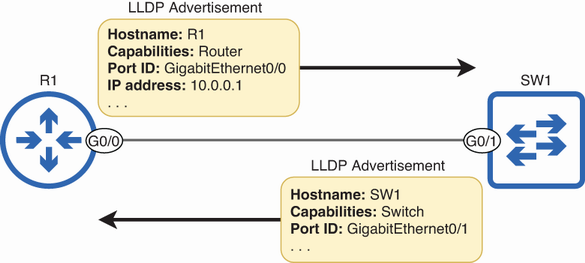
Use the topology figure to visualize two neighboring devices exchanging LLDP information comparable to CDP information. section 1.2
