Client-server architecture separates devices or applications that request services from servers that process requests and provide responses. This separation supports scalable network services and lets client and server applications evolve independently when their interface remains compatible. section 4.1 section 23.3.1
Recognize the pattern through these operating characteristics:
- Clients initiate requests; servers respond with resources, configuration, or other services. section 4.1 section 23.3.1
- The server may maintain state: DHCP tracks leased addresses, while REST exchanges are stateless and independent. section 4.1 section 23.3.1
- The roles are functional rather than permanent: a network device can act as a client for one service and a server for another. section 8.1
- Apply the pattern through protocol-specific details, such as DHCP UDP ports 67 and 68 or REST HTTP requests. section 4.4 section 23.3.1
DHCP lease
A host broadcasts a DHCP DISCOVER, receives an OFFER, broadcasts a REQUEST, and receives an ACK. The server then records the lease and supplies an IP address, netmask, default gateway, and DNS server. On Cisco IOS, administrators can define excluded addresses with ip dhcp excluded-address and create a pool with ip dhcp pool. section 4.4 section 4.1
Figure 4.1 R1, a DHCP server, leases IP addresses to clients PC1 and PC2. In addition to IP addresses, clients learn their netmask, default gateway, and DNS server addresses. R1 keeps track of leases and when they expire.
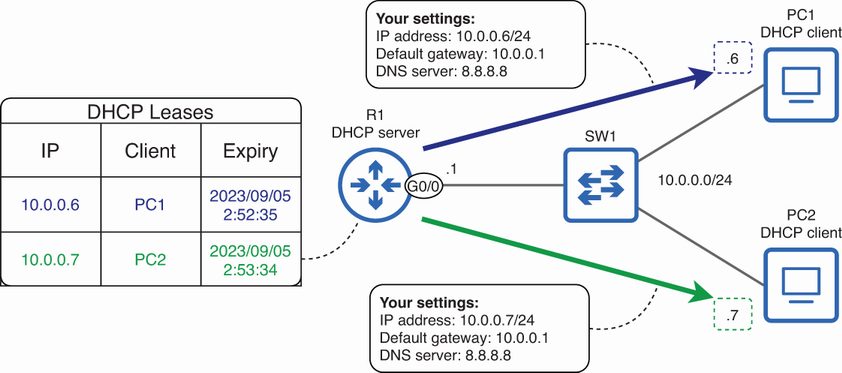
Shows a router leasing addresses and network parameters to clients while tracking lease expiration. section 4.1




