DHCP automatically supplies hosts with IP addresses, netmasks, default gateways, DNS server addresses, and other network configuration. It replaces error-prone manual configuration with a scalable client–server process, especially for end-user devices that move between networks. section 4.0 section 4.1
Follow the four-message DORA lease process:
- DISCOVER: The client, initially using 0.0.0.0, broadcasts to 255.255.255.255 to locate DHCP servers and request an address. section 4.1.1 section 4.4
- OFFER: A server offers an IP address and other settings, either by unicast to the offered address or by broadcast. section 4.1.1 section 4.4
- REQUEST: The client broadcasts acceptance of an offered address; if several servers respond, it typically accepts the first offer. section 4.1.1 section 4.4
- ACK: The server confirms and finalizes the lease, allowing the client to communicate using the supplied parameters. section 4.1.1 section 4.4
DHCP uses UDP port 67 for server messages and UDP port 68 for client messages. The server is stateful: it tracks leased addresses and their expiration. A router commonly acts as the DHCP server in small networks. section 4.1 section 4.1.1
On Cisco IOS, reserve addresses with ip dhcp excluded-address low-ip high-ip in global configuration mode, then create a lease pool with ip dhcp pool name. Network and client configuration details are supplied within the pool. section 4.4 section 4.0
Exam quick check
A newly connected PC broadcasts DISCOVER, receives an OFFER, broadcasts REQUEST, and receives ACK. Remember: DHCP server UDP 67; DHCP client UDP 68. section 4.1.1 section 4.4
Figure 4.2 Leasing an IPv4 address via DHCP (the DORA process): (1) DISCOVER from client to server, (2) OFFER from server to client, (3) REQUEST from client to server, (4) ACK from server to client.
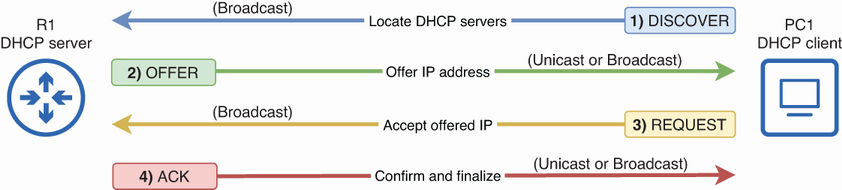
Trace the IPv4 lease exchange from client DISCOVER through server ACK. section 4.1.1
