A DHCP client is a host or network interface that requests an IP address and related parameters from a DHCP server. The server leases an address and can provide a netmask, default gateway, and DNS server, avoiding error-prone manual configuration. section 4.1 section 4.4
Use the DORA sequence to remember how a client obtains a lease:
- DISCOVER: broadcasts from 0.0.0.0 to 255.255.255.255 to locate DHCP servers. section 4.1.1 section 4.4
- OFFER: a server proposes an IP address and other configuration parameters. section 4.1.1
- REQUEST: the client accepts an offer, normally broadcasting its selection. section 4.1.1 section 4.4
- ACK: the server confirms and finalizes the lease, enabling network communication. section 4.1.1 section 4.4
DHCP uses UDP port 67 for the server and UDP port 68 for the client. DHCP is stateful because the server tracks leased addresses. Unlike ordinary end hosts, routers and switches usually use static addresses, but an ISP-facing router interface commonly acts as a DHCP client. section 4.1.1 section 4.1.3
Configure a Cisco IOS interface as a DHCP client
Enter interface configuration mode, apply "ip address dhcp", and enable the interface with "no shutdown". IOS then reports the assigned address; "show ip interface" identifies the address as DHCP-derived, and "show ip route" can show an automatically installed default route through the ISP. That DHCP-learned route is displayed with the code S, although it was not manually configured. section 4.1.3 section 4.1.3
Figure 4.2 Leasing an IPv4 address via DHCP (the DORA process): (1) DISCOVER from client to server, (2) OFFER from server to client, (3) REQUEST from client to server, (4) ACK from server to client.
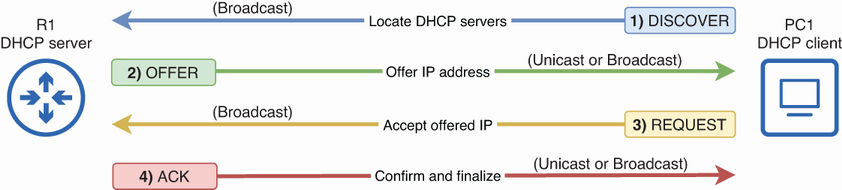
Follow the four-message IPv4 exchange from client DISCOVER through server ACK. section 4.1.1
Figure 4.5 R1 is a DHCP client of the ISP. (1) Configure G0/1 to learn its IP address via DHCP. (2) DORA exchange between R1 and the ISP router. (3) R1 configures the learned IP on G0/1, and adds a default route via the ISP router.
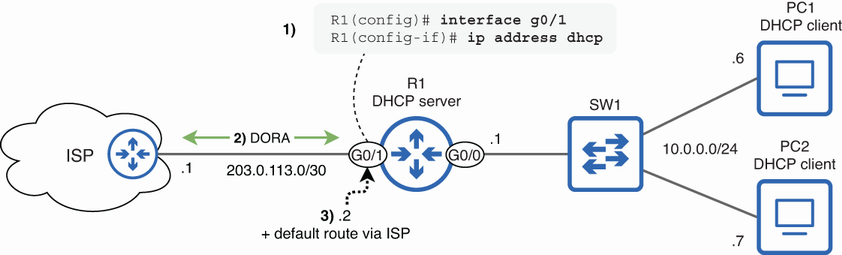
Trace an ISP-connected router interface as it learns an address and installs a default route. section 4.1.3
